
TPI in a hacksaw blade means the number of teeth that fit within one inch.
Understanding what is TPI in hacksaw blade selection helps you cut faster, cleaner, and with less effort. TPI affects how the blade handles thin sheet metal, thick steel bar, plastic pipe, and other materials. After using different hacksaw blades for rough cuts, fine work, and repair jobs, I have found that choosing the wrong TPI is one of the most common causes of slow cutting and broken teeth.
What Is TPI in a Hacksaw Blade?
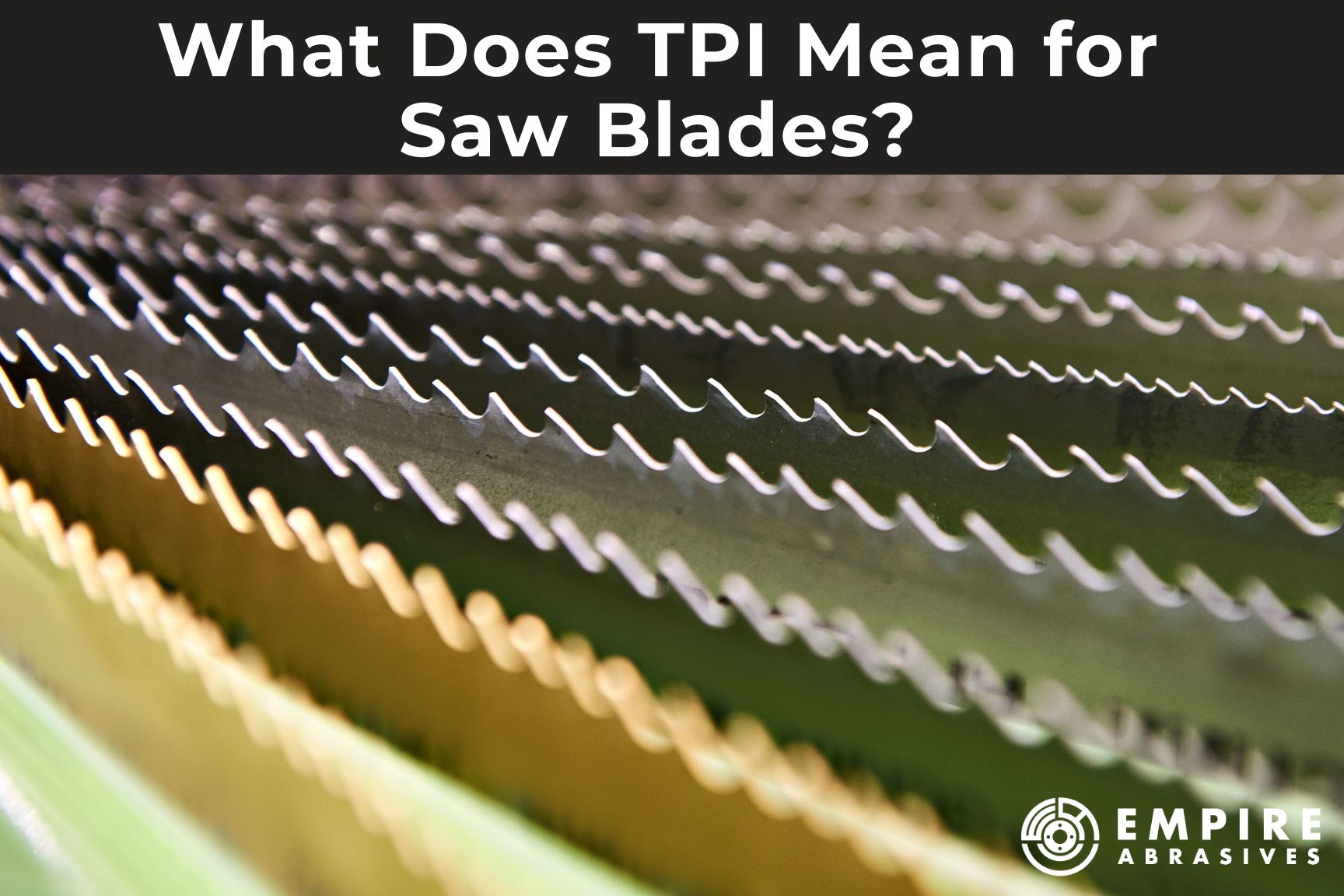
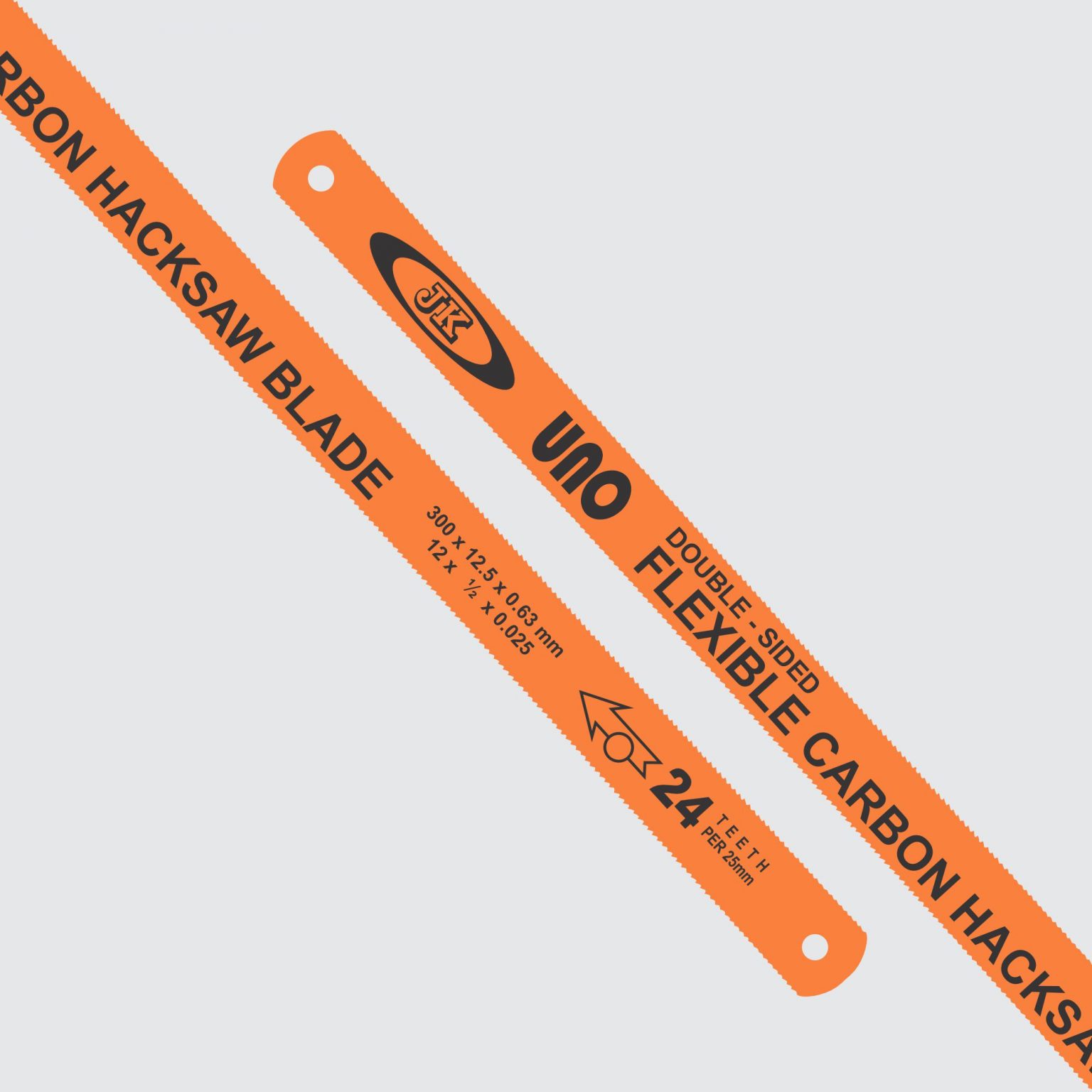
TPI stands for teeth per inch. It tells you how many cutting teeth appear along one inch of the hacksaw blade.
For example:
• A 14 TPI blade has 14 teeth in one inch.
• A 24 TPI blade has 24 teeth in one inch.
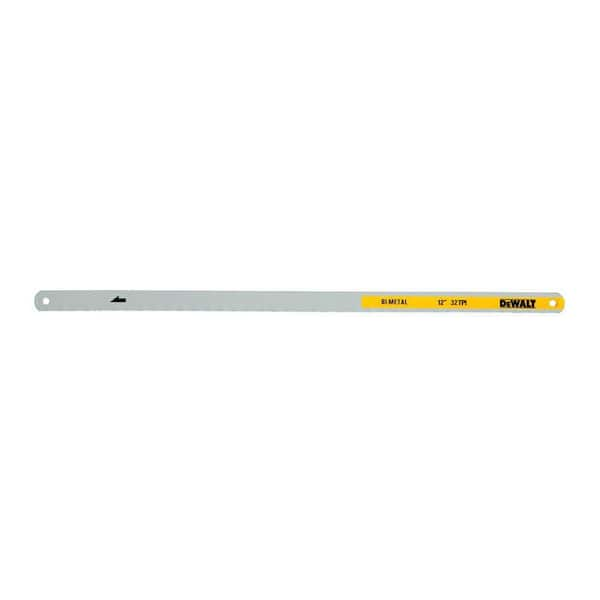
• A 32 TPI blade has 32 teeth in one inch.
A lower TPI blade has fewer, larger teeth. It removes more material with each stroke and works well on thick materials. A higher TPI blade has more, smaller teeth. It makes a smoother cut and works better on thin metal or small parts.
The answer to what is TPI in hacksaw blade is simple, but choosing the right number requires more thought. You must consider the material, its thickness, the type of cut, and the blade material.
Think of TPI like the teeth on a kitchen saw. Large teeth work quickly through a thick piece of wood. Small teeth make a smoother cut on a thin or delicate piece. A hacksaw blade follows the same basic idea.

How TPI Affects Cutting Performance
TPI changes how a hacksaw blade enters and leaves the material. It also affects cutting speed, surface finish, vibration, and blade life.
A low TPI blade has deep spaces between its teeth. These spaces are called gullets. The gullets carry chips away from the cut and reduce clogging.
A high TPI blade has smaller gullets. It produces a finer cut, but the small spaces can fill quickly when cutting thick or soft material.
Here is how TPI usually affects performance:
• Low TPI cuts quickly and removes more material.
• High TPI creates a smoother and more controlled cut.
• Low TPI works well on thick stock.
• High TPI works well on thin stock.
• The wrong TPI can cause vibration, tooth damage, or a very slow cut.
The key rule is that at least three teeth should touch the workpiece during the cut. Many metalworking guides use this rule because it helps prevent tooth stripping. If only one or two teeth touch the material, the teeth can catch and break.
If too many teeth touch the workpiece, the blade may rub instead of cut. The gullets cannot clear chips well, so the blade may heat up and move slowly.
This balance explains why what is TPI in hacksaw blade is more than a basic definition. TPI is a performance choice.

Common Hacksaw Blade TPI Sizes
Hacksaw blades commonly come in 14, 18, 24, and 32 TPI sizes. Some manufacturers also offer 20, 28, or variable pitch blades.
14 TPI blades
A 14 TPI blade has large teeth and deep gullets. It is suitable for thick materials such as:
• Heavy steel bar
• Large aluminum sections
• Thick brass
• Structural metal
• Large pipes
This blade cuts quickly, but it may leave a rougher edge. Use steady pressure because large teeth can grab thin or flexible material.
18 TPI blades
An 18 TPI blade offers a useful balance between speed and finish. It works well for:
• Medium steel stock
• Copper pipe
• Aluminum plate
• Medium wall tubing
• General workshop repairs
This is often a good general purpose option when you are unsure which blade to choose.
24 TPI blades
A 24 TPI blade is a popular choice for light metalwork. It works well on:
• Thin wall steel tubing
• Sheet metal
• Small steel bolts
• Electrical conduit
• General repair work
Many household and maintenance tasks fall into the range where a 24 TPI blade performs well.
32 TPI blades
A 32 TPI blade has fine teeth and makes a smooth, narrow cut. It is useful for:
• Thin sheet metal
• Small diameter tubing
• Thin brass or copper
• Delicate parts
• Finishing cuts
It cuts more slowly than a 14 TPI blade, but it reduces the risk of catching on thin material.

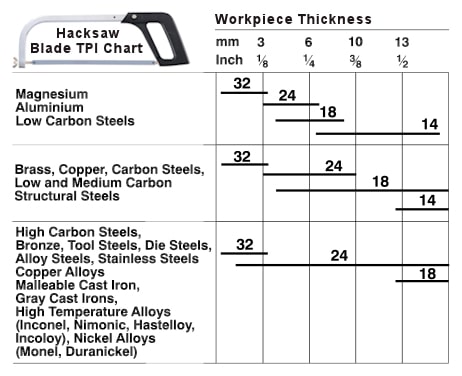
Hacksaw Blade TPI Chart
The following chart gives a practical starting point for choosing a blade.
| Material or job | Suggested TPI | Main reason |
|---|---|---|
| Thick steel bar | 14 TPI | Large teeth remove material quickly |
| Heavy steel pipe | 14 to 18 TPI | Deep gullets clear large chips |
| Medium steel stock | 18 TPI | Good balance of speed and control |
| Aluminum bar | 14 to 18 TPI | Larger gullets help prevent clogging |
| Copper pipe | 18 to 24 TPI | Produces a clean cut with less grabbing |
| Thin wall tubing | 24 TPI | Keeps several teeth in contact |
| Sheet metal | 24 to 32 TPI | Fine teeth reduce tooth snagging |
| Small bolts | 24 to 32 TPI | Helps create a clean, narrow cut |
| Plastic pipe | 18 to 24 TPI | Limits rough edges and cracking |
This chart is not a strict rule. Material hardness, blade quality, cutting angle, and workpiece shape also matter.
For example, aluminum is soft but can clog a blade. A coarse blade may help clear chips, but too few teeth can grab the material. A fine blade may cut cleanly, but it can load with aluminum quickly. Lubrication and light pressure can make a major difference.
How to Choose the Right TPI
Choosing the correct TPI begins with the thickness of the material, not just its type.
Use these steps:
- Measure the thickness of the material in the direction of the cut.
- Decide whether you need speed or a smooth finish.
- Make sure at least three teeth will contact the workpiece.
- Consider whether the material is hard, soft, flexible, or brittle.
- Choose the blade material and tooth pattern for the job.
- Test the blade with light pressure before applying full force.
For thick material, choose a lower TPI. For thin material, choose a higher TPI.
Suppose you need to cut a steel tube with a 1 inch wall thickness. A 14 or 18 TPI blade may work well. If you need to cut a thin metal strip that is only 1/16 inch thick, a 24 or 32 TPI blade is usually safer.
A useful calculation is to compare the material thickness with the tooth spacing. Tooth spacing is roughly the inverse of TPI. A 24 TPI blade has smaller tooth spacing than an 18 TPI blade, so more teeth can contact thin stock.
One mistake I have seen often is choosing a 32 TPI blade because it appears more precise. On thick steel, that fine blade can become slow and clogged. Another common mistake is using a 14 TPI blade on thin sheet metal. The large teeth may catch the edge and remove teeth from the blade.
TPI, Pitch, and Tooth Spacing
TPI and pitch describe related ideas, but they are not exactly the same.
TPI counts the number of teeth in one inch. Pitch measures the distance from one tooth to the next. As TPI increases, tooth spacing becomes smaller.
For example:
• 14 TPI has a coarse pitch.
• 24 TPI has a medium or fine pitch.
• 32 TPI has a very fine pitch.
Some blades use metric pitch instead of TPI. A metric pitch may be listed in millimeters, such as 1.0 mm or 1.4 mm. The concept remains the same: smaller spacing gives more teeth per length.
You may also see variable pitch blades. A variable pitch blade uses different tooth spacing along the same blade. For example, a blade may be marked 10/14 TPI or 18/24 TPI.
Variable pitch reduces vibration and can make the blade more forgiving. It is useful for cutting tubing, profiles, and materials that tend to resonate during sawing.
What Does Variable TPI Mean?
Variable TPI means the blade has more than one tooth spacing. The tooth pattern changes along the blade rather than staying constant.
A variable TPI hacksaw blade can offer several benefits:
• Lower vibration
• Smoother cutting
• Less noise
• Reduced tooth stripping
• Better performance on tubing and irregular shapes
This design helps prevent several teeth from striking the workpiece at the same time in a repeating pattern. That repeating contact can cause vibration and chatter.
Variable pitch does not replace correct blade selection. A 10/14 TPI blade may still be too coarse for very thin sheet metal. Likewise, an 18/24 TPI blade may cut too slowly through a thick steel bar.
Use the material thickness rule first. Then consider variable pitch if vibration, noise, or tooth damage is a problem.

Hacksaw Blade Materials and Tooth Forms
TPI is important, but it is only one part of a hacksaw blade. The blade material also affects performance and service life.
Carbon steel blades
Carbon steel blades are often low cost. They can work for light jobs and soft materials, but they usually wear faster than bi-metal blades.
High speed steel blades
High speed steel teeth are harder and resist wear. They can cut tougher materials, but the blade may be less flexible if the entire blade is made from a hard steel.
Bi-metal blades
Bi-metal blades combine a flexible alloy backing with hard high speed steel teeth. This design gives the blade both toughness and wear resistance.
Bi-metal blades are often a strong choice for steel, stainless steel, and demanding repair work. They cost more than basic carbon blades, but their longer life can make them more economical.
Tooth set
The tooth set describes how teeth bend slightly from side to side. This creates a kerf, or cut width, that is wider than the blade body. A proper tooth set helps prevent the blade from binding.
Common tooth patterns include:
• Regular set teeth for general cutting
• Wavy set teeth for thin sheet and interrupted cuts
• Raker set teeth for smoother, steady cutting
The best TPI in a hacksaw blade will still perform poorly if the blade is dull, damaged, or poorly tensioned.
How to Use a Hacksaw Blade Correctly
Correct technique helps the selected TPI work as intended.
- Install the blade with the teeth pointing forward on a standard push stroke hacksaw.
- Tighten the blade until it is firm and straight.
- Mark the cutting line clearly.
- Start with short, light strokes to create a guide groove.
- Keep the blade at a steady angle.
- Use long strokes that use most of the blade length.
- Apply firm pressure on the forward stroke.
- Reduce pressure on the return stroke.
- Let the teeth cut instead of forcing the frame.
- Use cutting fluid when the material and blade maker recommend it.
A common error is using only a small section of the blade. This wears one area quickly and creates heat. Long strokes spread wear across more teeth.
Another mistake is pushing hard during every part of the stroke. A hacksaw blade cuts on the forward stroke. Pressing during the return stroke can bend teeth and increase friction.
For stainless steel, use steady pressure and avoid stopping in the same groove for too long. Stainless steel can work harden when rubbed without cutting. Once the surface hardens, the blade may struggle to enter it.
Signs You Chose the Wrong TPI
The blade often tells you when the TPI does not match the job.
Watch for these signs:
• The blade vibrates or chatters.
• The teeth strip or break.
• The cut fills with packed material.
• The blade becomes hot very quickly.
• The cut takes much longer than expected.
• The blade jumps out of the cutting groove.
• The material bends instead of cutting cleanly.
• The cut edge is much rougher than expected.
A blade with too few teeth may snag and strip. A blade with too many teeth may clog and rub.
If the blade is cutting slowly but the teeth remain sharp, the TPI may be too high. If the teeth break near the start of the cut, the TPI may be too low, the blade may be loose, or the cutting pressure may be too high.
Also inspect the frame. A weak or bent hacksaw frame can create problems that look like a TPI issue.
TPI Mistakes to Avoid
Learning what is TPI in hacksaw blade is easy. Using it correctly takes practice.
Avoid these common mistakes:
• Selecting a blade only by price
• Using a coarse blade on thin sheet metal
• Using a fine blade on thick steel
• Ignoring the material thickness
• Running the blade backward
• Using a loose blade
• Applying pressure on the return stroke
• Cutting without securing the workpiece
• Continuing to use a blade with missing teeth
• Using no lubrication on materials that need it
Never continue using a blade after several adjacent teeth are missing. Missing teeth can cause vibration and make the remaining teeth carry too much load.
Secure the workpiece in a vise or suitable clamp. Keep your hands away from the cutting path, and wear eye protection. Hacksaw blades can break, especially when they are over-tightened, twisted, or used with heavy side pressure.
TPI for Different Materials
Different materials respond to different tooth patterns and cutting speeds.
Steel
Steel often works well with 18 to 24 TPI for general jobs. Thick steel may need 14 TPI, while thin steel may need 24 or 32 TPI.
Stainless steel
Stainless steel is tough and can harden from friction. Use a sharp bi-metal blade, steady pressure, and a suitable cutting fluid. An 18 to 24 TPI blade is common for many stainless steel parts.
Aluminum
Aluminum is soft, but it can clog the gullets. Use a blade with enough tooth space and clean the blade when needed. A 14 to 18 TPI blade often works for thick aluminum, while 24 TPI may suit thin sections.
Copper and brass
Copper and brass are soft and can grab the blade. A medium or fine blade with controlled pressure usually gives a cleaner result. Lubrication can reduce friction.
Plastic pipe
Plastic cuts easily but may crack or melt. An 18 to 24 TPI blade often provides a good balance. Use light pressure and support the pipe close to the cut.
TPI Compared With Other Saw Measurements
TPI is not the same as blade thickness, blade width, kerf, or frame size.
• TPI describes tooth count per inch.
• Blade thickness describes how thick the steel strip is.
• Blade width describes the distance from the tooth edge to the back edge.
• Kerf describes the width of the cut.
• Blade length describes the distance between the mounting holes.
Most hand hacksaw blades use a standard length, but always check the frame before buying a replacement. A blade with the correct TPI may still be unusable if it does not fit the frame.
Some powered reciprocating saw blades also use TPI markings. The selection principles are similar, but machine speed, stroke length, and blade compatibility become important. Do not assume that every hacksaw blade can be used in a powered tool.
Frequently Asked Questions About What Is TPI in Hacksaw Blade
What does TPI stand for on a hacksaw blade?
TPI stands for teeth per inch. It tells you how many cutting teeth are arranged along one inch of the blade.
Is a higher TPI hacksaw blade better?
A higher TPI blade is better for thin material and smooth cuts. It is not automatically better for thick stock because it may cut slowly and clog.
What TPI is best for cutting steel?
An 18 or 24 TPI blade works well for many steel cutting tasks. Use 14 TPI for thick steel and 32 TPI for very thin sheet or small parts.
What TPI should I use for thin metal?
Use a 24 to 32 TPI blade for thin metal in many cases. The higher tooth count helps keep several teeth engaged and reduces snagging.
Can I use a 14 TPI blade on thin metal?
You can, but it is usually a poor choice. Large teeth may catch the edge, bend the sheet, or lose teeth during the cut.
What does 18/24 TPI mean?
An 18/24 TPI marking usually identifies a variable pitch blade. Its tooth spacing changes between about 18 and 24 teeth per inch to help reduce vibration.
How many teeth should touch the material?
Try to keep at least three teeth in contact with the workpiece. This reduces tooth stripping and helps the blade cut in a controlled way.
Does TPI affect hacksaw blade speed?
Yes. Lower TPI blades often cut thick material faster because they remove larger chips. Higher TPI blades may cut thin material more effectively but usually need slower, steadier strokes.
Conclusion
TPI in a hacksaw blade means teeth per inch, and that number guides how the blade handles different materials. Low TPI suits thick stock and fast material removal. High TPI suits thin stock and smoother cuts. The best choice also depends on blade material, tooth pattern, workpiece thickness, and cutting technique.
For a reliable starting point, use 14 to 18 TPI for thick material, 18 to 24 TPI for general work, and 24 to 32 TPI for thin metal. Keep at least three teeth engaged, secure the workpiece, and use steady strokes.
Choose your next hacksaw blade by checking the material thickness first, then match the TPI to the job. If this guide helped, explore more tool care and metal cutting resources, and share your own hacksaw tips in the comments.