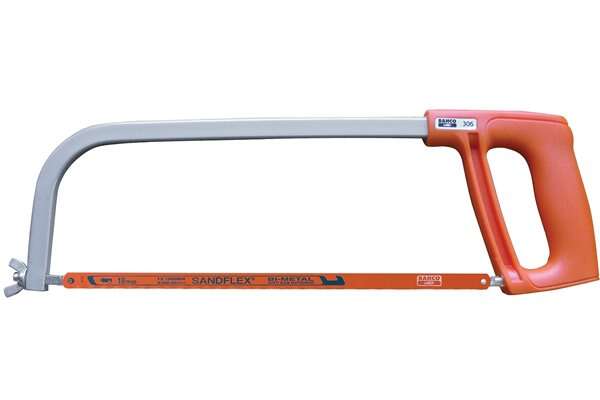
Which Way Should A Hacksaw Blade Face: Correct Direction
Introduction
For most hacksaws used in the United States, the blade teeth should face away from the handle. The teeth point toward the front of the saw because a standard hacksaw cuts on the forward push stroke.
This setup lets the blade remove metal as you push it through the work. Pulling the saw back should require little force. If the teeth face the handle, the saw may cut poorly, snag, or damage the blade.
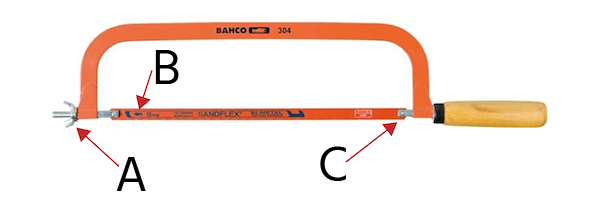
Why Hacksaw Teeth Face Forward
A hacksaw blade has small teeth cut at an angle. Those teeth work like tiny chisels. When they point forward, they bite into the material during the push stroke.
The frame keeps the blade under tension. As you push the saw, the teeth cut a narrow path through metal, plastic, or other hard materials. On the return stroke, the teeth slide back over the cut with less resistance.
This cutting action is different from that of many wood saws. Some wood saws cut on the pull stroke, but a standard hacksaw is designed to cut on the push stroke.
A forward-facing blade also matches the design of most traditional American hacksaw frames. The handle, frame, and blade tension system are built around pushing the saw through the work.
The simple rule
Install the blade so:
- The teeth point away from the handle.
- The smooth back of the blade points toward the handle.
- The blade cuts when you push the saw forward.
- The return stroke feels light and controlled.
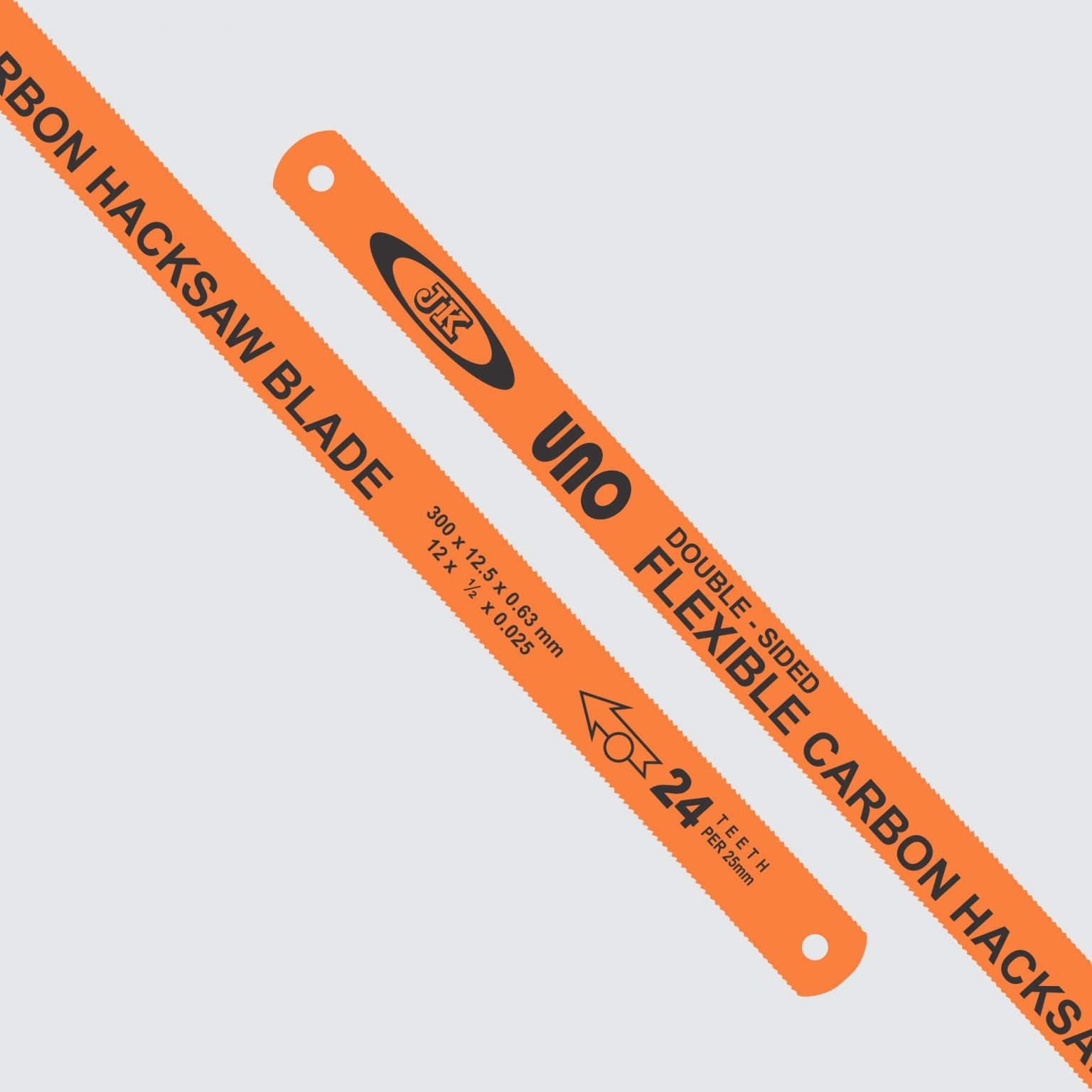
Most hacksaw blades have an arrow stamped on the blade. If you see one, point the arrow toward the front of the hacksaw.
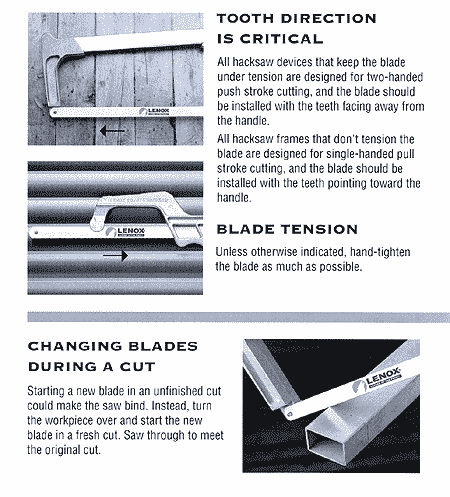
How to Install a Hacksaw Blade Correctly
Installing the blade takes only a few steps, but the blade must be tight and properly seated.
1. Loosen the blade tension
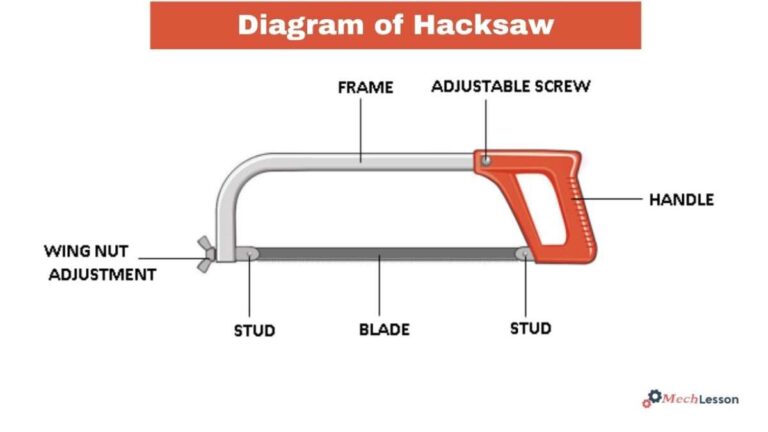
Most full-size hacksaws have a wing nut, lever, or tension knob near the front of the frame. Turn or release it until the old blade becomes loose.
Do not twist the blade sideways while it is still tight. A loose blade is easier and safer to remove.
2. Remove the old blade
Lift the blade from the mounting pins at each end of the frame. Wear gloves if the blade is broken or has sharp edges.
Inspect the frame before installing the new blade. Replace a bent frame or damaged tension screw rather than forcing a new blade into it.
3. Check the tooth direction
Hold the new blade with the teeth visible. Point the teeth away from the handle.
If the blade has a directional arrow, the arrow should point toward the front end of the saw.
4. Seat both mounting holes
Place one hole over the mounting pin at the handle end. Then fit the other hole over the pin at the front of the frame.
The blade should sit straight. The teeth should face the same direction along the full length of the blade.
5. Tighten the blade
Increase tension until the blade feels firm. A properly tensioned blade should not sag or move easily from side to side.
Do not overtighten it. Excess tension can bend the frame, damage the mounting pins, or cause a brittle blade to snap.
6. Check the blade before cutting
Look along the blade from the front of the saw. It should appear straight and centered in the frame.
Make a light test cut on scrap material. The saw should cut on the forward stroke and move back smoothly.

How Tight Should a Hacksaw Blade Be?
A hacksaw blade should be tight enough to stay straight, but not so tight that the frame or blade is under excessive stress.
A loose blade can bend during a cut. This often causes crooked cuts, broken teeth, or a blade that twists out of the cut. A blade that is too tight can break without much warning.
As a basic check, press lightly against the side of the blade with a finger. It should have very little sideways movement. Do not use a hard pluck or forceful test, since that can damage a thin blade.
The exact tension depends on the frame and blade. Many professional frames use a tension lever or threaded adjuster. Follow the instructions supplied with that frame when available.
Signs of correct tension
A properly tensioned blade:
- Stays straight during a light cut.
- Does not bow away from the cut line.
- Remains seated on both frame pins.
- Produces an even cutting sound.
- Does not twist when the saw moves forward.
If the blade bends even when you use light pressure, stop cutting. Check the tension, blade condition, and frame alignment.
What Happens if the Blade Faces the Wrong Way?
If the teeth face the handle, the hacksaw will usually cut poorly because the blade is working against its intended cutting direction.
You may notice these signs:
- The saw barely cuts when pushed.
- The blade catches when pulled back.
- The teeth skid across the surface.
- The blade vibrates or chatters.
- More force is needed than usual.
- The teeth become dull or break.
- The cut takes longer and may wander.
A backward blade may still remove a small amount of material. That does not mean it is installed correctly. The cutting edges are designed to work in one main direction.
Turn off or secure the work before correcting the blade. Do not try to reverse the blade while it is under tension.
Do All Hacksaw Blades Face Forward?
No. The forward-facing rule applies to a standard hacksaw that cuts on the push stroke. Some specialty saws and compact frames are designed for a different cutting action.
Before installing a blade, check the tool’s instructions. Pay close attention to these exceptions:
Pull-stroke saws
Some compact hand saws are designed to cut while you pull the blade toward yourself. Their teeth may face the handle.
This design is common in some Japanese-style saws and specialty cutting tools. It is not the usual setup for a standard American hacksaw.
Handle-mounted mini saws
Small hacksaw handles may use a short blade with a different frame design. The blade may still face forward, but the handle can make the direction less obvious.
Look for an arrow or tooth diagram on the package. If no instructions are available, identify the stroke that moves the teeth into the material.
Reciprocating saw blades
A reciprocating saw is powered and uses a different blade system. The teeth can face up or down depending on the job and the blade design.
Do not apply the standard hacksaw rule to a reciprocating saw without checking its blade instructions. Disconnect the battery or power source before changing the blade.
Flexible or specialized blades
Some blades are made for special materials or unusual cutting methods. Their tooth pattern may not follow the common hacksaw arrangement.
The tool maker’s instructions take priority over a general rule.

Choosing the Right Hacksaw Blade
Blade direction is only one part of getting a clean cut. The blade also needs the right tooth count for the material and thickness.
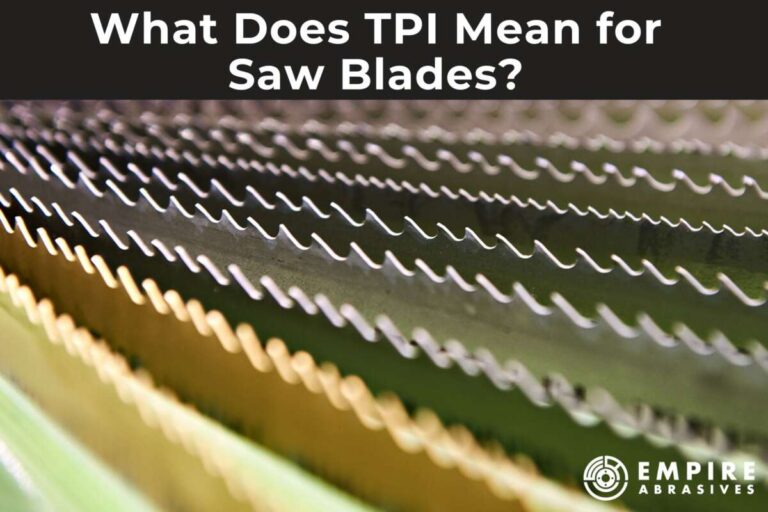
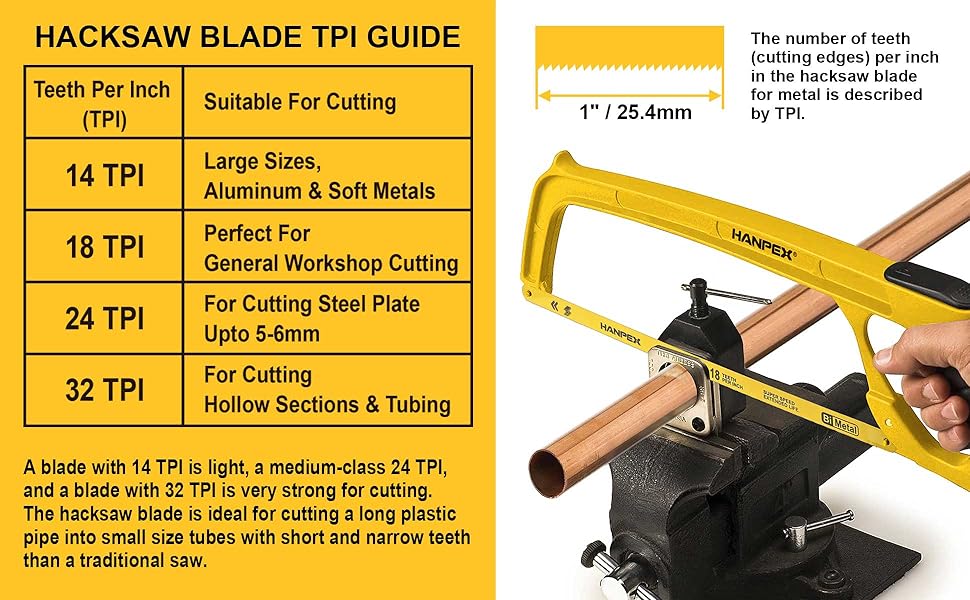
Hacksaw blades are often described by teeth per inch, or TPI. A higher TPI gives more, smaller teeth. A lower TPI gives fewer, larger teeth.
Use this general guide:
| Material or job | Common blade choice | Reason |
|---|---|---|
| Thin sheet metal | 24–32 TPI | Helps keep several teeth in the material |
| Small tubing | 24–32 TPI | Reduces snagging and tooth damage |
| General steel or aluminum | 18–24 TPI | Balances speed and control |
| Thick steel stock | 14–18 TPI | Larger gullets clear material more easily |
| Plastic or soft material | 14–24 TPI | Depends on thickness and risk of clogging |
These ranges are general starting points, not fixed rules. The material thickness matters as much as the material type.
Try to keep at least two or three teeth engaged in the work at one time. If only one tooth contacts thin sheet metal, the blade may catch and break teeth. If the teeth are too fine for thick stock, the cut can be slow and the blade may clog.
For hard metal, use a sharp bi-metal blade and cutting fluid approved for the material. Keep the blade moving steadily rather than forcing it.
How to Cut Safely With a Hacksaw
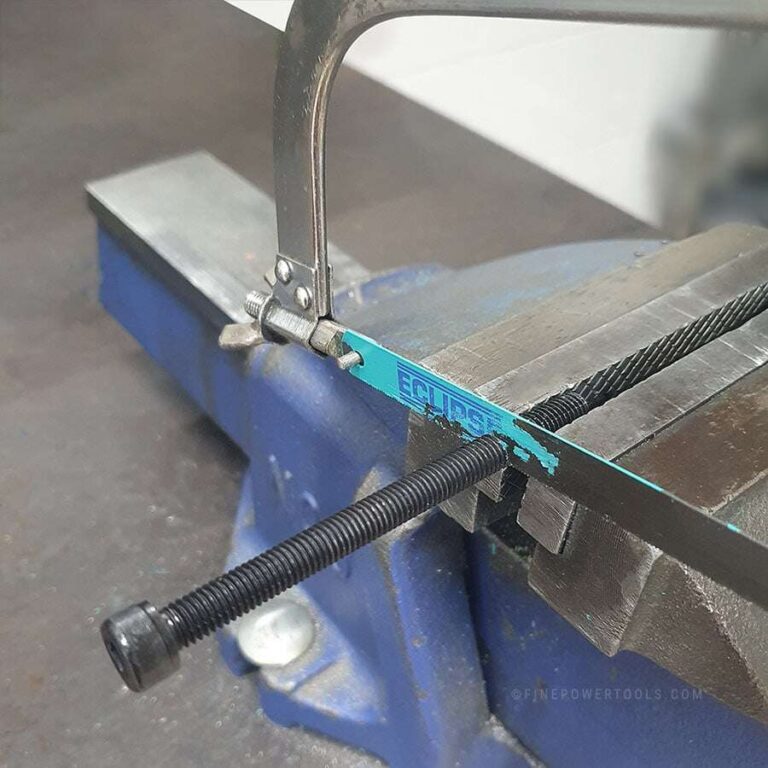
Secure the work before you start. A vise is usually the best choice for pipe, rod, tubing, and metal stock. The material should not shift as the blade moves.
Mark the cut with a clear line. Place the work so the cut is close to the vise jaws. Long, unsupported pieces can vibrate and make the blade wander.
Hold the handle firmly, but do not grip it so tightly that your hand tires. Use long, controlled strokes. Let the teeth do the cutting instead of forcing the frame.
Keep both hands clear of the blade path. Wear eye protection because hacksaw teeth can break and small metal chips can fly. Gloves can protect against sharp edges, but they do not replace safe hand placement.
Remove burrs after the cut. A file or deburring tool can smooth the edge, but handle the freshly cut material carefully because it may be sharp.
The Occupational Safety and Health Administration treats hand tools as a workplace safety concern. Its hand-tool guidance emphasizes using the right tool, keeping tools in good condition, and wearing suitable personal protective equipment. For work, follow your employer’s safety rules as well as the tool manufacturer’s instructions.

Troubleshooting a Hacksaw That Will Not Cut Well
Start with the blade direction and condition. These checks are simple and often solve the problem.
The blade cuts only when pulled
The blade may be installed backward, or the tool may be a pull-stroke design. Check the arrow and the manufacturer’s instructions.
The blade bends during the cut
Increase tension slightly, reduce pressure, and make sure the work is firmly held. A bent frame or dull blade can also cause bending.
The teeth break quickly
The blade may have too few teeth for thin material. You may also be pushing too hard, twisting the frame, or starting the cut at an angle.
Use a finer blade for thin stock. Keep the frame square to the work and let the teeth start the cut before applying steady pressure.
The blade skips or chatters
Check that the work is secure. A dull blade, loose tension, or an uneven starting angle can make the teeth skip.
Start with short, light strokes until a groove forms. Then use longer strokes that keep the blade aligned with the groove.
The cut is crooked
Keep the frame square to the material. Do not twist the handle to speed up the cut. Replace the blade if it has become bent or dull.
The blade cuts slowly
Check whether the blade is dull, clogged, or unsuitable for the material. A blade with too many teeth can cut thick stock very slowly. A blade with too few teeth may snag on thin stock.

Common Hacksaw Blade Mistakes
The most common mistake is installing the teeth backward. The next is using too much force.
Avoid these errors:
- Using a dull blade because it still appears intact.
- Choosing a low-TPI blade for very thin sheet metal.
- Choosing a high-TPI blade for thick steel.
- Cutting without securing the work.
- Applying side pressure to the blade.
- Bending the frame during the stroke.
- Overtightening the blade.
- Using a damaged blade with missing or cracked teeth.
- Starting with long, hard strokes before making a groove.
- Holding the material by hand near the cut.
A blade is a low-cost part compared with the time lost from a poor cut or the risk of a broken blade. Replace it when the teeth are dull, missing, rounded, or damaged.

Key Takeaways
- A standard hacksaw blade should face away from the handle.
- The teeth should cut on the forward push stroke.
- An arrow on the blade usually points toward the front of the saw.
- Keep the blade tight and straight, but do not overtighten it.
- Choose the TPI based on the material and its thickness.
- Secure the work and wear eye protection.
- Check the instructions for specialty pull-stroke saws and unusual blade systems.
FAQs
Should the teeth on a hacksaw face toward or away from you?
On a standard hacksaw, the teeth face away from the handle and toward the front of the saw. When the tool is held normally, the teeth face away from you.
Does a hacksaw cut on the push or pull stroke?
A standard hacksaw cuts on the push stroke. Use light pressure as you push forward, then ease off while pulling the saw back.
Can you put a hacksaw blade in backward?
You can physically install many blades backward, but the saw will not work correctly. Reverse the blade so its teeth point away from the handle.
Which hacksaw blade is best for thin metal?
A fine blade with about 24 to 32 TPI is a common choice for thin metal. The exact choice depends on the metal and its thickness. Keep several teeth engaged in the material.
Why does my hacksaw blade keep breaking?
Common causes include excessive force, loose work, incorrect tooth size, side pressure, poor tension, and a bent or damaged frame. Check these causes before installing another blade.
Should you use oil when cutting metal with a hacksaw?
A small amount of suitable cutting fluid can reduce heat and friction when cutting some metals. Use the product according to its label, keep it away from your skin and eyes, and do not use it where it creates a slip or fire hazard.
Conclusion
For a regular hacksaw, install the blade with the teeth pointing away from the handle. The saw should cut as you push it forward, while the return stroke remains light.
If the blade still cuts poorly, check its direction, tension, sharpness, TPI, and the way the work is secured. Those five checks solve most hacksaw problems before you need a different tool.
Recent Tool Guides
 Hammer
How To Hammer Flowers Onto Paper: Easy Guide
Learn how to hammer flowers onto paper with simple steps, helpful tips, and beautiful results for...
Read Guide → Wrench
How To Use A Hex Wrench: Easy Step-By-Step Guide
Learn how to use a hex wrench correctly with simple steps, helpful tips, and common mistakes...
Read Guide → Hacksaw
How To Cut Curtain Pole With Hacksaw: Easy Guide
Learn how to cut curtain pole with hacksaw safely and neatly. Follow simple steps for accurate...
Read Guide → Wrench
How To Use A Husky Torque Wrench: Easy Guide
Learn how to use a Husky torque wrench correctly with simple steps, torque settings, and safety...
Read Guide → Hammer
How To Hold A Hammer: Safe Grip Guide
Learn how to hold a hammer with the right grip, stance, and technique for safer, more...
Read Guide → Hacksaw
How To Cut Flexible Metal Conduit With Hacksaw: Easy Guide
Learn how to cut flexible metal conduit with hacksaw safely and cleanly. Follow simple steps for...
Read Guide →