When Should You Ease The Tension On A Hacksaw Blade: Tips
Ease the tension on a hacksaw blade after you finish cutting, before you replace the blade, and before storing the hacksaw for a long time. During a cut, keep the blade tight enough to stay straight. Do not loosen it while the blade is moving or under cutting pressure.
This advice applies to common hacksaws used in U.S. homes, garages, workshops, and job sites. Releasing tension helps reduce stress on the frame, tension screw, and blade. Always follow the instructions for your specific hacksaw, especially if it uses a quick-release or spring-loaded frame.

Why Hacksaw Blade Tension Matters
Hacksaw tension keeps the blade straight as you push it through metal, plastic, or other materials. A blade with too little tension can bend, twist, or wander. A blade with too much tension can place extra stress on the frame and may cause the blade or fitting to fail.
The right tension is not a single number for every hacksaw. It depends on:
- The frame design
- The blade length
- The blade thickness
- The blade material
- The cut material
- The manufacturer’s instructions
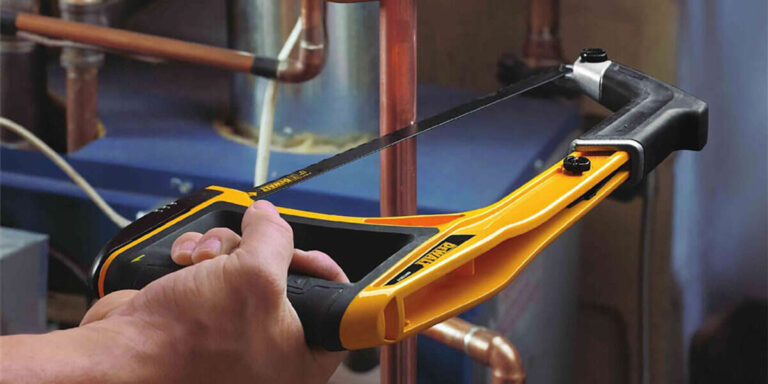
Most standard hacksaws use a threaded tension screw. Turning the screw changes the distance between the blade mounts and pulls the blade tight. Some newer frames use a lever or quick-release system instead.
What proper tension feels like
A correctly tensioned blade should feel firm and straight. It should not sag when you hold the saw by the frame. A light tap may produce a short, clear sound, but sound alone is not a reliable tension test.
The blade should also remain aligned with the frame. If it bends sideways with light finger pressure, it may be too loose. If the tension screw is extremely hard to turn, the frame may be under excessive load.
Why too much tension is a problem
High tension does not automatically make a hacksaw cut faster. It can instead:
- Bend the frame
- Strip the tension screw or nut
- Damage the blade mounting holes
- Increase the chance of a sudden blade break
- Make a thin blade more likely to crack
The risk is greater when the blade is old, damaged, installed at an angle, or used with heavy force.
When Should You Loosen a Hacksaw Blade?
Loosen the blade at four main times: after use, before blade replacement, before long-term storage, and when the saw will not be used for an extended period.
1. After you finish using the hacksaw
For routine shop use, ease the tension after the cutting job is complete. This removes constant load from the frame and tension parts while the tool sits unused.
You do not need to loosen and retighten the blade between every single stroke or short cut. If you are making several cuts in one work session, keep the blade tensioned until the work is done.
2. Before changing the blade
Always release the tension before removing a hacksaw blade. A tight blade can spring loose when you remove one end. The blade may also have sharp teeth, so sudden movement can cause a cut.
A safe sequence is:
- Stop work and place the hacksaw on a stable surface.
- Wear work gloves when handling the blade.
- Turn the tension screw or release the frame lever slowly.
- Keep your fingers away from the blade teeth.
- Remove the old blade only after the tension is fully released.
- Inspect the frame and blade mounts before installing the new blade.
3. Before long-term storage
Ease the tension before storing the hacksaw for weeks or months. This is especially useful in a home workshop, where the tool may sit unused between projects.
Store the blade and frame in a dry place. Lightly protect the frame or tension screw from rust if the tool will be kept in a damp garage. Do not leave a heavily tensioned blade in storage unless the manufacturer specifically permits it.
4. When the saw will not be used for an extended period
If you are moving the tool, packing it in a toolbox, or putting it away at the end of a project, release the tension first. A loose blade is less likely to place stress on the frame during transport.
Keep the blade installed only if it is protected from contact and the saw’s instructions allow it. For long storage, removing the blade can provide extra protection from rust and accidental contact.
When Should You Keep the Blade Tight?
Keep the hacksaw blade tensioned while you are actively cutting. A loose blade can buckle or twist when you apply forward pressure. That can ruin the cut and may cause the blade to break.
Before cutting, check the tension and blade direction. Most hacksaw blades are installed with the teeth pointing away from the handle so they cut on the forward stroke. Some specialty saws use a different setup, so check the blade or tool instructions.
Do not try to adjust tension while the blade is moving. Stop the cut, remove the saw from the workpiece, and place it where it cannot fall. Then make a small adjustment.
Signs the blade is too loose
A blade may need more tension if:
- It visibly sags
- It twists during a cut
- The cut starts to wander
- The blade vibrates or chatters
- The blade bows when you apply normal pressure
- The saw makes a rough, uneven cut
A loose blade may also cut slowly because energy is lost through bending instead of cutting.
Signs the blade is too tight
A blade may have too much tension if:
- The tension screw becomes very hard to turn
- The frame starts to bend
- The blade breaks during light work
- The blade mount or pin looks distorted
- The saw feels unusually rigid or stressed
A blade that breaks does not always indicate excessive tension. It may also be worn out, installed incorrectly, forced through the cut, or damaged by side pressure.
How to Set Hacksaw Blade Tension Safely
Use small adjustments rather than tightening the blade as far as possible. The goal is a straight, stable blade, not maximum force.
Step 1: Inspect the saw
Check the frame, blade mounts, tension screw, pins, and handle. Do not use the saw if the frame is cracked, badly bent, or loose at the joints.
Inspect the blade for rust, missing teeth, cracks, and bent ends. Replace a damaged blade. A blade with a damaged mounting hole can fail even when tension is correct.
Step 2: Install the blade correctly
Fit both ends of the blade onto the frame pins or mounting slots. Make sure the blade sits straight and fully engages both mounts.
Keep your hands clear of the teeth. Even a dull-looking hacksaw blade can cut skin.
Step 3: Add tension gradually
Turn the tension screw or engage the tension lever until the blade becomes straight. Continue with only small adjustments until the blade feels firm.
Do not use pliers or another tool to force the tension screw unless the manufacturer specifically allows it. Hand adjustment is usually enough for a standard hacksaw.
Step 4: Check alignment
Look along the blade from the side and from above. It should run in line with the frame. If it points to one side, release the tension and reinstall it rather than trying to correct the problem with more force.
Step 5: Test the first cut
Start with light pressure. Let the teeth do the cutting. If the blade bends, vibrates, or moves sideways, stop and inspect the tension, blade condition, and workpiece support.
Step 6: Release tension after the task
When the job is complete, stop the saw and ease the tension before placing it in storage. Leave the frame ready for the next use, but do not leave the blade heavily loaded for long periods.
Does Blade Tension Change for Different Materials?
The basic tension goal stays the same, but the cutting conditions change with the material. A thin blade may need more care because it can flex more easily. A thick blade may tolerate normal tension better, but it can still break if you force it sideways.
Cutting steel
Use a blade with a tooth pitch suited to the stock thickness. Keep the blade straight and use steady pressure. Excessive force can bend the blade and overload the frame.
Cutting aluminum
Aluminum can clog the teeth, especially when the blade has a fine tooth pattern. Use a blade intended for the material and clean the teeth when needed. Do not compensate for clogging by adding excessive tension.
Cutting plastic
Plastic can catch or melt if you use the wrong blade or push too hard. Use controlled strokes and support the workpiece well. A loose blade can snag and bend as the plastic flexes.
Cutting thin sheet
Thin material can strip teeth or catch the blade if too few teeth contact the workpiece. Choose a fine-tooth blade and avoid twisting the saw. Correct blade selection matters more than increasing tension.
Blade Tension, Tooth Count, and Cutting Force
Blade tension is only one part of a clean hacksaw cut. The blade’s tooth count must also suit the material thickness.
A useful rule is to keep several teeth engaged with the workpiece at all times. If the material is thin and the teeth are too coarse, the blade may grab the edge. If the teeth are too fine for thick stock, the cut may be slow and the gullets may clog.
| Cutting condition | Main concern | Better practice |
|---|---|---|
| Thick steel bar | Heavy cutting load | Use a suitable coarse or medium blade and steady strokes |
| Thin sheet metal | Tooth snagging | Use a finer blade and support the sheet |
| Aluminum | Tooth clogging | Use a suitable blade and clear packed material |
| Plastic tubing | Catching or melting | Use light pressure and controlled strokes |
| Long storage | Frame stress | Ease the tension before putting the saw away |
These are general choices, not a substitute for the blade maker’s instructions. The correct blade depends on the exact material and thickness.
What to Do If the Blade Keeps Breaking
Repeated blade breakage usually points to a problem beyond normal tension. Check the following in order.
Check the blade mounts
Make sure both blade ends sit fully on the frame pins. A blade that is only partly engaged can fail when tension is added.
Check for side pressure
A hacksaw blade cuts in a straight line. Twisting the frame, turning sharply during the cut, or using the blade as a pry bar can break it.
Check the blade direction
A backward blade may not cut well and may encourage excessive force. Confirm the tooth direction before starting.
Check the blade condition
Replace blades with rust, cracks, bent ends, missing teeth, or signs of fatigue. A worn blade often makes the user push harder, which increases the chance of failure.
Check the frame
A bent frame can pull the blade out of line. Compare it with a new or known-good frame if possible. Do not straighten a frame that is cracked or badly damaged.
Check the cutting method
Clamp the workpiece firmly. Use smooth, full-length strokes when the space allows. Let the teeth cut instead of forcing the saw through the material.
If a blade breaks near your hands or if the frame shows damage, stop using the tool. Replace the damaged part before continuing.
Common Mistakes to Avoid
Leaving maximum tension on the saw
A hacksaw does not need the highest possible tension to work well. Tighten it only enough to keep the blade straight and stable.
Loosening the blade during a cut
Never adjust a blade while it is engaged with the workpiece. The saw can shift, and the blade may release suddenly.
Using tension to fix the wrong blade
More tension will not correct an unsuitable tooth pattern, clogged teeth, a dull blade, or poor workpiece support.
Storing the saw with a damaged blade
A damaged blade can rust, break, or cut someone during handling. Remove it and dispose of it safely.
Treating all hacksaw frames the same
Some frames use a screw, while others use a lever or a spring system. Read the tool’s instructions before changing the tension method.
Using a hacksaw as a pry tool
The frame and blade are designed for cutting. Prying places side load on the blade and can cause sudden breakage.
Hacksaw Safety in a U.S. Workshop
Wear safety glasses when cutting. Broken teeth, chips, and small metal fragments can become airborne. Use additional face protection when the work creates a high level of debris.
Secure the material in a vise or suitable clamp. Keep both hands on the saw only when the workpiece is stable and your hand position is clear of the blade path.
Keep the saw under control at the end of each stroke. Avoid striking nearby objects with the frame. OSHA’s general hand-tool guidance stresses that tools should be kept in safe condition and used for their intended purpose; follow your employer’s rules on a job site.
For work involving coated, painted, galvanized, or unknown material, consider the dust and fume risks. Do not cut material that may contain hazardous substances unless you know the required controls.
Quick Decision Guide
Use this short guide when deciding whether to ease hacksaw blade tension:
- You are cutting now: Keep the blade properly tensioned.
- The blade is moving: Stop before making any adjustment.
- You are changing the blade: Release all tension first.
- The job is finished: Ease the tension before storage.
- The saw will sit unused for weeks or months: Release the tension.
- The blade feels loose during cutting: Stop and add a small amount of tension.
- The frame bends or the screw resists strongly: Stop and inspect the tool.
- The blade breaks repeatedly: Check the blade, mounts, material, and cutting method.
The practical rule is simple: tight for cutting, loose for storage and blade changes.
FAQs
Should you loosen a hacksaw blade after every use?
Yes, it is good practice to ease the tension after a work session, especially if the tool will sit unused. You do not need to release it between short cuts made during the same task.
How tight should a hacksaw blade be?
The blade should be straight and firm without placing extreme load on the frame. If the tension screw is very difficult to turn or the frame starts to bend, the blade is likely too tight.
Can a loose hacksaw blade cut metal?
It can cut, but the blade may wander, twist, vibrate, or break. A properly tensioned blade gives better control and a straighter cut.
Should I remove the blade before storing a hacksaw?
For long-term storage, removing the blade can reduce accidental contact and help prevent rust. If you leave it installed, release the tension and protect the tool from moisture.
Why does my hacksaw blade bend while cutting?
Common causes include low tension, side pressure, a dull or damaged blade, poor workpiece support, or an incorrect blade for the material. Stop cutting and check these causes before adding more tension.
Conclusion
Ease the tension on a hacksaw blade when the work is finished, before changing the blade, and before long-term storage. Keep enough tension during cutting to hold the blade straight, but avoid maximum force.
Good blade tension works with the right tooth pattern, a firm workpiece, and smooth strokes. If the blade bends, breaks, or causes the frame to flex, stop and inspect the whole setup rather than simply tightening the blade more.
Recent Tool Guides
 Hammer
How To Hammer Flowers Onto Paper: Easy Guide
Learn how to hammer flowers onto paper with simple steps, helpful tips, and beautiful results for...
Read Guide → Wrench
How To Use A Hex Wrench: Easy Step-By-Step Guide
Learn how to use a hex wrench correctly with simple steps, helpful tips, and common mistakes...
Read Guide → Hacksaw
How To Cut Curtain Pole With Hacksaw: Easy Guide
Learn how to cut curtain pole with hacksaw safely and neatly. Follow simple steps for accurate...
Read Guide → Wrench
How To Use A Husky Torque Wrench: Easy Guide
Learn how to use a Husky torque wrench correctly with simple steps, torque settings, and safety...
Read Guide → Hammer
How To Hold A Hammer: Safe Grip Guide
Learn how to hold a hammer with the right grip, stance, and technique for safer, more...
Read Guide → Hacksaw
How To Cut Flexible Metal Conduit With Hacksaw: Easy Guide
Learn how to cut flexible metal conduit with hacksaw safely and cleanly. Follow simple steps for...
Read Guide →