

A hacksaw blade cuts on the forward push stroke, when its teeth face away from the handle.
Knowing how a hacksaw works helps you cut faster, protect the blade, and avoid rough edges. The phrase “a hacksaw blade cuts on the” usually points to the forward stroke, but tooth direction, blade tension, material, and cutting pressure all matter. This guide explains the process in simple terms, with practical tips for safe, clean cuts.
A Hacksaw Blade Cuts on the Push Stroke
A standard hacksaw blade cuts on the push stroke. This means the teeth remove metal as you move the saw away from your body. During the return stroke, the blade should slide back with light pressure and little or no cutting force.
The teeth usually point away from the handle. If you hold the handle in your right hand, the teeth point toward the front of the hacksaw frame. This setup lets the blade bite into the material when you push forward.
The phrase a hacksaw blade cuts on the forward stroke describes the main action clearly. The blade does not cut equally in both directions. Its teeth act like many small chisels, and their shape is designed to remove material during the push.
A good cutting rhythm looks like this:
- Place the blade on the marked cut line.
- Push the saw forward with steady pressure.
- Reduce pressure as the stroke ends.
- Pull the blade back lightly.
- Repeat the motion with long, even strokes.
A hacksaw blade cuts on the push stroke because its teeth are angled to scrape and remove material in that direction. Reversing the blade may cause poor cutting, tooth damage, or an unsafe loss of control.
Why Hacksaw Teeth Point Forward
Hacksaw teeth have a set shape and angle called tooth rake. This design controls how the teeth enter the workpiece. Most general-purpose blades use teeth that point away from the handle so the cutting force travels forward.
The blade’s teeth are small, but each tooth removes a tiny amount of material. Together, they create a narrow groove called a kerf. The kerf becomes deeper as you continue the forward push stroke.
This is why a hacksaw blade cuts on the forward stroke instead of the pull stroke. The tooth shape gives the blade a leading edge that works best when pushed into metal, plastic, or another suitable material.
The blade’s tooth set also matters. The teeth are bent slightly from side to side, creating a cut wider than the blade itself. This prevents the blade sides from rubbing tightly against the material.
If the blade is installed backward, several problems can occur:
• The saw may slide instead of cutting.
• The teeth may snag or chip.
• The operator may push harder than needed.
• The cut may wander from the marked line.
• The blade may wear much faster.
Always check the arrow or tooth direction before tightening the blade. If the frame has no direction mark, make sure the teeth face away from the handle.

How to Use a Hacksaw Correctly
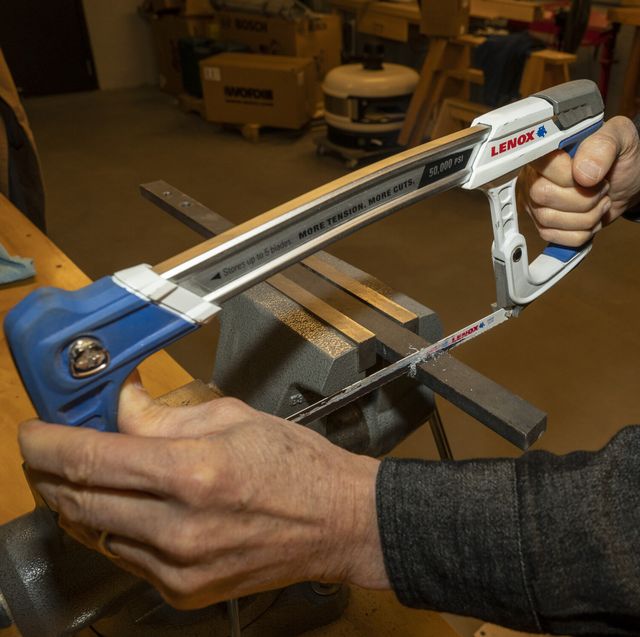
Using a hacksaw is simple, but good technique makes a major difference. Start by marking the cut with a fine-tip marker, machinist’s scribe, or layout dye. A clear line helps you track the blade and prevents wasted material.
Secure the workpiece in a vise. The cut line should sit close to the vise jaws. This reduces vibration and keeps the material from flexing. Thin pieces can bend if they extend too far from the vise.
Next, select the correct part of the blade. Use the middle section when possible. Cutting with the end of the blade can make the saw jump and can damage the teeth.
Follow these steps:
- Install the blade with the teeth pointing away from the handle.
- Tighten the blade until it feels firm and straight.
- Place the blade on the cut line.
- Make two or three gentle forward strokes to create a starting groove.
- Use long strokes that engage most of the blade.
- Apply pressure only during the forward stroke.
- Keep the blade square to the workpiece.
- Slow down near the end of the cut.
- Support the loose section so it does not snap or fall.
- Remove the burr with a file after cutting.
A hacksaw blade cuts on the push stroke, so pressing during the return stroke wastes energy. It also bends the blade and can cause a crooked cut.
In shop work, one common mistake is using short, fast strokes. This feels quick, but it often heats the blade and wears only a small part of the teeth. Long, calm strokes usually cut better and help the blade last longer.

Choosing the Right Hacksaw Blade
Blade selection affects speed, finish, and tool life. Hacksaw blades are commonly rated by teeth per inch, or TPI. Common choices include 14, 18, 24, and 32 TPI.
Use this basic guide:
• 14 TPI works well for thick steel, cast iron, and large sections.
• 18 TPI suits medium-thickness steel and general shop work.
• 24 TPI is a good choice for thin metal tubing and sheet metal.
• 32 TPI works well for thin wall sections, small rods, and delicate materials.
Choose a blade that allows at least two or three teeth to touch the material at one time. If too few teeth engage, the blade may catch and break. If too many teeth engage, chips can clog the spaces between them.
Blade material also matters. Carbon steel blades cost less and work for light tasks. Bi-metal blades combine a flexible backing with harder teeth. They usually last longer and resist breakage during demanding cuts.
A hacksaw blade cuts on the forward stroke whether it is carbon steel or bi-metal. However, a higher-quality blade can handle more pressure and maintain its teeth for a longer time.
For stainless steel or hardened material, choose a blade made for tough alloys. Do not force a general-purpose blade through hard stock. The blade may become dull before it completes the cut.

Cutting Different Materials
A hacksaw can cut many materials, but each one needs a slightly different approach. Metal is the most common material, yet plastic, wood, and composite materials may also be cut with special blades.
Cutting Steel and Aluminum
Use a suitable metal-cutting blade and keep the workpiece firmly clamped. Steel often needs steady pressure and a slower pace. Aluminum cuts more easily, but its soft chips can clog the blade.
A small amount of cutting oil can reduce heat and friction on steel. Use oil only when appropriate for the material and work area. Keep oil away from handles and surfaces where it may create a slipping hazard.
Cutting Thin Tubing
Thin tubing needs a fine-tooth blade, often 24 or 32 TPI. A coarse blade can catch the thin wall and tear it. Place the cut close to the vise and use light pressure.
A hacksaw blade cuts on the forward stroke, but thin tubing may deform if you press too hard. Let the teeth do the work instead of forcing the frame.
Cutting Plastic
Use a fine-tooth blade for rigid plastic. Move at a moderate pace because heat can melt the cut edges. If the plastic begins to soften, pause and let it cool.
For plastic pipe, rotate the pipe as you cut if the setup allows. This can help maintain a square cut and reduce binding.
Cutting Wood
A standard hacksaw blade is not the best choice for wood. Its teeth are designed mainly for metal and may clog with wood fibers. Use a proper wood saw for clean, fast results.

Common Problems and Their Causes
When a hacksaw performs poorly, the problem usually comes from blade direction, pressure, tension, or tooth choice. Solving the cause is better than simply pushing harder.
The Blade Does Not Cut
Check whether the teeth point away from the handle. A reversed blade may glide over the surface or cut very slowly.
Also inspect the blade for dull or broken teeth. If the teeth look rounded, replace the blade. A dull blade creates heat and encourages excessive pressure.
The Blade Breaks
Blade breakage often comes from too much pressure, poor tension, or twisting. Keep the blade straight and use smooth strokes. Do not turn the frame while the teeth are deep in the cut.
A blade that is too fine for thick material may also break. Select a coarser blade so the teeth can clear chips more easily.
The Cut Wanders
A wandering cut may result from starting too fast. Begin with short, gentle strokes until the groove is established. Then use longer strokes while keeping the frame square.
Letting the material move in the vise can also cause a crooked cut. Tighten the vise and place the cut near the jaws.
The Cut Is Rough
A rough cut may indicate the wrong TPI, a dull blade, or excessive pressure. Use a finer blade for thin material and finish the edge with a flat file.
The final part of the cut deserves extra care. Support the loose section and reduce pressure so the remaining material does not tear.
A hacksaw blade cuts on the push stroke, but force alone does not improve the finish. Control, alignment, and the right blade matter more than muscle.
Safety Tips for Hacksaw Work
A hacksaw is a simple hand tool, but it can still cause cuts, pinches, and eye injuries. Wear safety glasses whenever you cut metal or brittle plastic. Small chips can travel farther than expected.
Inspect the frame and blade before use. Do not use a blade with severe cracks, missing teeth, or a loose mounting pin. Replace damaged parts rather than trying to make them work.
Keep both hands in safe positions. One hand controls the handle, while the other may guide the frame only if it stays clear of the blade path. Never place fingers near the cut line.
Use these safety habits:
• Clamp the work firmly.
• Keep the blade properly tensioned.
• Wear eye protection.
• Keep the cutting path clear.
• Use slow strokes near the end.
• Do not twist the frame during a cut.
• Store the hacksaw with the blade protected.
• Clean metal chips with a brush, not bare hands.
Many workshop injuries happen when a person rushes the final few strokes. The material suddenly breaks, and the hand or tool moves forward without control. Slow down as the cut nears completion.

Practical Lessons From Real Workshop Use
One useful lesson is that a hacksaw rewards patience. New users often push hard because the cut seems slow. In practice, hard pressure can bend the blade, heat the workpiece, and shorten blade life.
Another common mistake is failing to use the full length of the blade. Short strokes wear a small area of teeth while leaving the rest unused. Long strokes spread the work across more teeth and keep the cut smoother.
It also helps to mark the cut on more than one side of square stock. Begin on the top face, then check the side face as the groove deepens. This simple habit helps prevent angled cuts.
For larger jobs, a powered band saw or reciprocating saw may be more efficient. A hand hacksaw remains useful when you need quiet operation, low cost, portability, or careful control.
The phrase a hacksaw blade cuts on the push stroke should guide your technique, but it does not mean every hacksaw or specialty blade works in exactly the same way. Some pull-cut tools use teeth designed for the return stroke. Always check the blade design before use.

Frequently Asked Questions About a Hacksaw Blade Cuts on the
Does a hacksaw blade cut on the push or pull stroke?
A standard hacksaw blade cuts on the push stroke. Its teeth should point away from the handle, and pressure should be applied as you move the blade forward.
Which way should hacksaw teeth face?
The teeth should face away from the handle. This position allows the blade to cut as you push the hacksaw forward through the material.
Should you apply pressure on the return stroke?
No. Use pressure on the forward stroke and release most pressure on the return stroke. This reduces blade bending, tooth damage, and unnecessary fatigue.
Why is my hacksaw not cutting?
The blade may be installed backward, dull, loose, or unsuitable for the material. Check tooth direction, blade tension, TPI, and the condition of the teeth.
What TPI hacksaw blade should I use for thin metal?
A 24 or 32 TPI blade usually works well for thin metal, tubing, and sheet stock. The fine teeth help prevent snagging and reduce damage to thin walls.
How tight should a hacksaw blade be?
The blade should be tight enough to stay straight under normal cutting pressure. It should not flex loosely, but excessive tension can damage the frame or break the blade.
Conclusion
A hacksaw blade cuts on the forward push stroke when its teeth face away from the handle. The best results come from steady pressure, proper blade tension, the right TPI, and a firmly supported workpiece.
Use long strokes, keep the frame square, and release pressure on the return stroke. Wear eye protection and slow down near the end of every cut. With these habits, you can make cleaner cuts, protect your blades, and work with much greater confidence.
Try these techniques on your next project, and explore more tool-use guides to build safer, sharper workshop skills.