
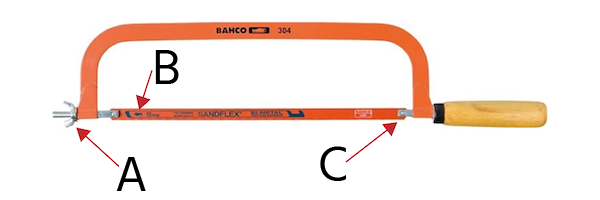
In the United States, a standard hacksaw blade is installed with its teeth pointing away from the handle. This setup lets the blade cut as you push the saw forward. The backstroke should use light pressure to return the saw, not to force the blade through the material.
If the teeth point toward the handle, the blade may still cut, but it will cut on the pull stroke. That is not the normal setup for a standard hacksaw and can make the tool harder to control.

Why Hacksaw Teeth Point Away From the Handle
Hacksaws normally cut on the forward stroke. When you push the frame away from the handle, the teeth bite into the workpiece and remove small chips of metal, plastic, or other material.
The return stroke should be gentle. It resets the saw for the next cut without loading the blade in the opposite direction.
This direction matches the way most full-size hacksaw frames are designed:
- The handle gives you control at the rear of the frame.
- Your forward push loads the blade in a straight line.
- The blade cuts on the push stroke.
- The teeth face away from your hand.
- The frame helps keep the blade tight during the cut.
A hacksaw blade is thin and flexible. It works best when the force stays in line with the blade. Pushing with the teeth facing away from the handle usually gives a steady, predictable cut.
The simple rule
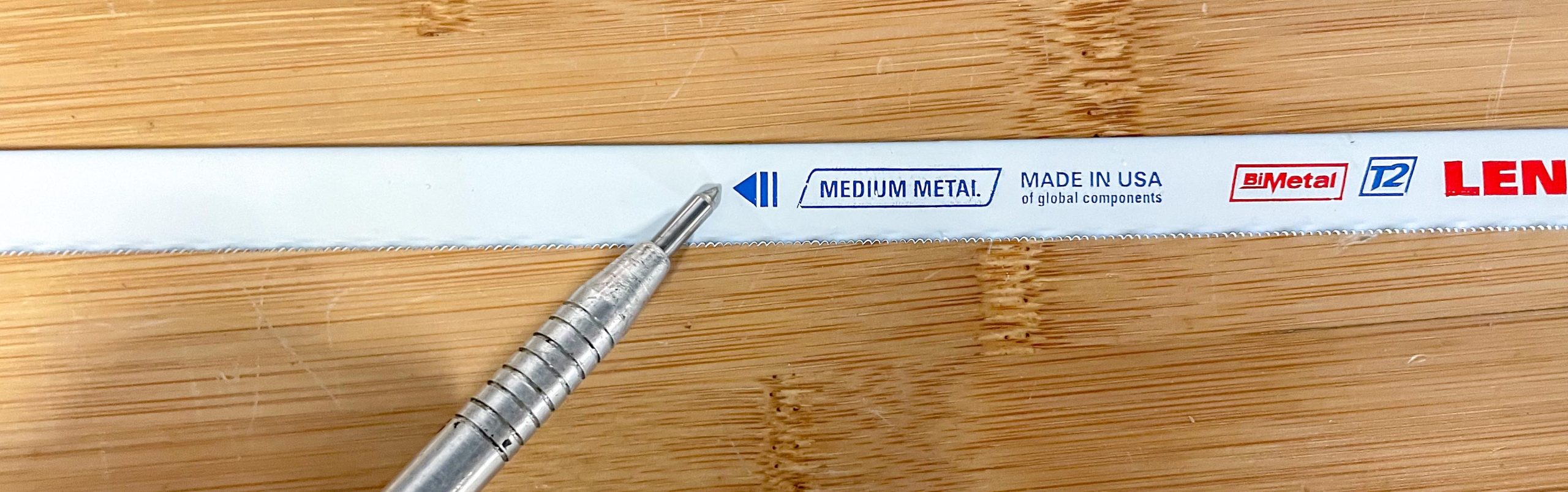
Install a standard hacksaw blade with the teeth pointing away from the handle.
Look at the small teeth before you tighten the blade. They should point toward the front end of the hacksaw frame.

How to Install a Hacksaw Blade Correctly
Replacing a hacksaw blade takes only a few steps. The exact frame may use a wing nut, lever, or tension knob, but the basic process is much the same.
1. Release the blade tension
Loosen the tension knob or lever until the old blade becomes slack. Do not try to remove a tight blade by bending the frame more than needed.
Some hacksaw frames hold a great deal of spring tension. Keep your fingers away from the blade ends while you release it.
2. Remove the old blade
Lift the blade from the mounting pins or posts at each end of the frame. Many standard blades have a small hole at both ends. These holes fit over the frame pins.
If the blade is broken, wear gloves or use pliers to handle it. Broken teeth and sharp blade edges can cut skin.
3. Check the new blade
Before installing the new blade, check three things:
- The blade fits the frame length.
- The mounting holes match the frame pins.
- The teeth face the correct direction.
For a standard hacksaw, the teeth should point away from the handle.
4. Fit one end of the blade
Place one mounting hole over the pin at the front or rear of the frame. Keep the teeth facing forward as you do this.
Do not twist the blade. A twisted blade can cut at an angle and may snap under pressure.
5. Fit the other end
pull the frame or adjust the tension knob enough to place the second hole over the other pin. The blade should sit straight between the two ends.
6. Tighten the blade
Increase the tension until the blade feels firm. A properly tensioned blade should not hang loose, but it should not be tightened until the frame or blade is under excessive strain.
A simple check is to lightly pluck the blade. It should make a short, firm sound and should not move far from side to side. This is only a rough check, not a precise tension measurement.
7. Make a light test cut
Start with slow, short strokes. Confirm that:
- The teeth bite on the forward stroke.
- The blade stays straight.
- The frame does not twist.
- The cut follows your marked line.
If the blade cuts on the backstroke, check its direction. It may be installed backward.

What Happens If the Blade Is Installed Backward?
A backward blade usually cuts on the pull stroke instead of the push stroke. The saw may still remove material, but the cutting action will feel unfamiliar and less efficient for a standard frame.
You may notice these signs:
- The blade slips when you push forward.
- The blade bites when you pull back.
- The saw feels awkward to control.
- The frame moves toward you during the cutting stroke.
- The cut starts slowly or wanders.
If this happens, stop and inspect the blade. Remove it and turn it around so the teeth point away from the handle.
Can a backward blade damage the saw?
Installing a blade backward does not usually damage the frame by itself. However, using the wrong direction can encourage poor technique. You may pull too hard, twist the frame, or use uneven pressure.
Those actions can break the blade, damage the workpiece, or cause the saw to slip. Reversing the blade is also more likely to produce a rough or inaccurate cut.
Do both sides of the blade have teeth?
Most standard hacksaw blades have teeth along one edge only. The smooth edge is the back of the blade.
If you cannot see the teeth clearly, run a finger near—but not along—the edge. A safer option is to hold the blade under a bright light and inspect the tooth pattern visually.

Are There Exceptions to the Standard Direction?
The usual answer is still “teeth away from the handle,” but a few situations can differ.
Some specialized saws are made for pull cutting. A manufacturer may specify a different blade direction for a particular frame, mini hacksaw, flush-cut saw, or specialty tool.
Follow the frame maker’s instructions when they conflict with the standard rule. The tool’s handle, blade mounts, and intended cutting stroke determine the correct direction.
Pull-cutting setups
A blade with teeth pointing toward the handle cuts as you pull the saw toward yourself. This can be useful in a tool designed for that action.
It is not automatically safer or better. A pull stroke can draw the tool toward your body, so body position and control matter. Do not use a pull-cut setup unless the frame and blade are designed for it or the manufacturer clearly permits it.
Small hacksaws and junior hacksaws
Small hacksaws may use shorter blades, lighter frames, or different tension systems. The common rule still applies: the teeth normally point away from the handle.
Because these tools have less frame support, avoid pushing hard. Let the teeth do the work and use short, controlled strokes.

How Blade Direction Affects Cutting Technique
Correct blade direction is only part of a clean hacksaw cut. Your stroke, pressure, blade choice, and workholding also matter.
Use forward pressure only
Apply moderate pressure on the push stroke. Ease off as you pull the saw back.
If you press hard on both strokes, the blade can flex and bind. This may cause a crooked cut or break the teeth.
Keep the frame straight
Hold the frame so the blade stays square to the workpiece. If the cut must be angled, mark the angle first and guide the frame slowly.
Do not twist the handle to make the blade turn. Hacksaw blades are made for straight cuts, not sharp curves.
Start with short strokes
Begin with short strokes to create a shallow groove. Once the groove guides the blade, use longer strokes that make use of more of the blade.
Longer strokes spread wear across more teeth. They can also make the cut faster when the workpiece allows them.
Secure the material
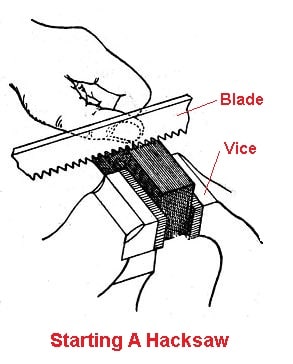
Clamp the workpiece firmly. A loose pipe, bar, bolt, or sheet can move when the blade catches.
For thin sheet metal, support the material close to the cut. Movement can cause vibration, rough edges, and broken teeth.
Choosing the Right Hacksaw Blade
Tooth direction tells you how to install the blade. Tooth count determines how well it cuts a given material.
Hacksaw blades are often described by teeth per inch, or TPI.
| Blade rating | Common use | General guidance |
|---|---|---|
| 14–18 TPI | Thick metal, aluminum, heavy stock | Use for larger work where the teeth can clear chips |
| 24 TPI | General metal cutting | A useful all-purpose choice for many repairs |
| 32 TPI | Thin metal, tubing, sheet stock | Helps keep several teeth engaged in thin material |
The exact choice depends on the blade design and workpiece. As a basic rule, at least a few teeth should contact the material at all times.
If the teeth are too coarse for thin metal, the blade may catch or strip teeth. If the teeth are too fine for thick stock, the cut may be slow and chips may clog the blade.
Carbon steel and bi-metal blades
Carbon steel blades can work well for light cutting and lower-cost jobs. Bi-metal blades combine a flexible backing with a harder tooth edge and are often chosen for tougher or more demanding work.
The blade material does not normally change the installation direction. Unless the package or tool instructions say otherwise, install the teeth facing away from the handle.
Common Hacksaw Blade Mistakes
Several small mistakes can make a correctly mounted hacksaw feel difficult to use.
Installing the teeth toward the handle
This reverses the normal cutting stroke. Turn the blade around before cutting.
Leaving the blade too loose
A loose blade can bow, wander, or vibrate. It may also twist when you apply pressure.
Increase tension until the blade is firm and straight. Do not overtighten it.
Using too much force
A hacksaw cuts through many materials with steady pressure. Heavy force can bend the blade and make the teeth catch.
Use a smooth push, then reduce pressure on the return stroke.
Using the wrong TPI
A coarse blade on thin material may snag. A fine blade on thick material may clog and cut slowly.
Choose a blade that keeps several teeth in contact with the workpiece.
Cutting without eye protection
Small chips can break free during a cut. Wear safety glasses or other suitable eye protection, especially when cutting hardened metal or brittle materials.
Hacksaw Safety in a U.S. Workshop
Wear safety glasses whenever you use a hacksaw. Secure the workpiece in a vise or with a suitable clamp, and keep your free hand away from the blade path.
Inspect the blade before use. Replace it if it has missing teeth, cracks, severe rust, or a bent edge. A damaged blade is more likely to break or wander.
Keep your body to the side of the cutting line rather than directly behind the frame. Use controlled strokes, and never put your face close to the blade while applying force.
After the cut, the workpiece may have a sharp burr. Remove the burr with a file or deburring tool. Handle freshly cut metal with care.
For electrical work, plumbing repairs, or any job where the cut material is connected to a live system, isolate the system first. A hacksaw does not make an unsafe work area safe.

Quick Troubleshooting Guide
| Problem | Likely cause | What to check |
|---|---|---|
| The saw will not bite on the push stroke | Blade is backward or worn | Confirm that teeth point away from the handle |
| The blade bends during the cut | Too little tension or too much pressure | Tighten the blade and use lighter strokes |
| The cut wanders | Workpiece moves or frame twists | Clamp the material and keep the frame square |
| Teeth break quickly | Wrong TPI, excess force, or blade twist | Choose a finer or coarser blade as needed and reduce pressure |
| Cutting feels very slow | Blade is dull, clogged, or too fine | Replace the blade or choose a better tooth count |
| The blade snaps at the mount | Overtensioning, bending, or poor alignment | Check the frame pins and tighten only enough to hold the blade firm |
If the problem continues after you confirm the blade direction, inspect the frame. Bent mounting posts or damaged tension parts can prevent the blade from sitting straight.

Frequently Asked Questions
Should hacksaw teeth point toward or away from you?
On a standard hacksaw, the teeth point away from you and away from the handle. The saw cuts as you push it forward.
Does a hacksaw cut on the push or pull stroke?
A standard hacksaw cuts on the push stroke. Use light pressure on the return stroke.
Can I use a hacksaw blade backward?
You can physically mount many blades in either direction, but a standard hacksaw is intended to cut with the teeth facing away from the handle. A backward blade cuts on the pull stroke and is usually harder to control.
Which side of a hacksaw blade is the cutting edge?
The edge with the small, sharp teeth is the cutting edge. The smooth edge is the back of the blade.
How tight should a hacksaw blade be?
The blade should be firm and straight with little side-to-side movement. Avoid extreme tension, which can damage the blade or frame.
Why does my hacksaw blade keep breaking?
Common causes include excess pressure, a loose or overtightened blade, a bent frame, blade twisting, or using the wrong blade for the material. Check the blade mounts and change your cutting technique before installing another blade.
Key Takeaways
- Install a standard hacksaw blade with the teeth pointing away from the handle.
- The blade should cut on the forward push stroke.
- Use light pressure on the return stroke.
- Tighten the blade until it is firm, but do not overtighten it.
- Clamp the workpiece and keep the frame square.
- Choose the blade’s TPI based on the material’s thickness.
- Follow the tool maker’s instructions for specialty pull-cut saws.
Conclusion
For nearly every standard hacksaw sold and used in the United States, the correct setup is simple: teeth forward, away from the handle. Push the saw to cut, ease off on the return stroke, and keep the blade straight and properly tensioned.
If your saw does not bite on the push stroke, stop and check the blade direction first. That quick inspection solves the most common hacksaw installation mistake.