Can A Hammer Drill Be Used As A Normal Drill: What To Know
Yes. A hammer drill can usually be used as a normal drill when you turn off its hammer function. In standard drill mode, it spins the bit without the forward-and-back impact used for masonry.
This makes a hammer drill useful for wood, metal, plastic, and many other common materials. However, it may be heavier, louder, and less comfortable than a standard drill. It can also cause damage if you leave hammer mode on while drilling delicate materials.
This guide explains how to use a hammer drill as a normal drill, which settings to choose, what bits to use, and when a regular drill is the better tool.
Introduction
For homeowners and DIY users in the United States, a hammer drill can often cover more jobs than one basic drill. It can drill pilot holes in wood, make holes in metal, drive screws, and drill into brick or concrete when the correct mode and bit are selected.
The key is simple: switch the tool to drill mode before working on non-masonry materials. The hammer setting should be used only when the job needs repeated impact.
A hammer drill is not the same as a rotary hammer. A hammer drill is a general-purpose drill with a light impact feature. A rotary hammer is a larger masonry tool made mainly for concrete, brick, and stone.
How a Hammer Drill Works
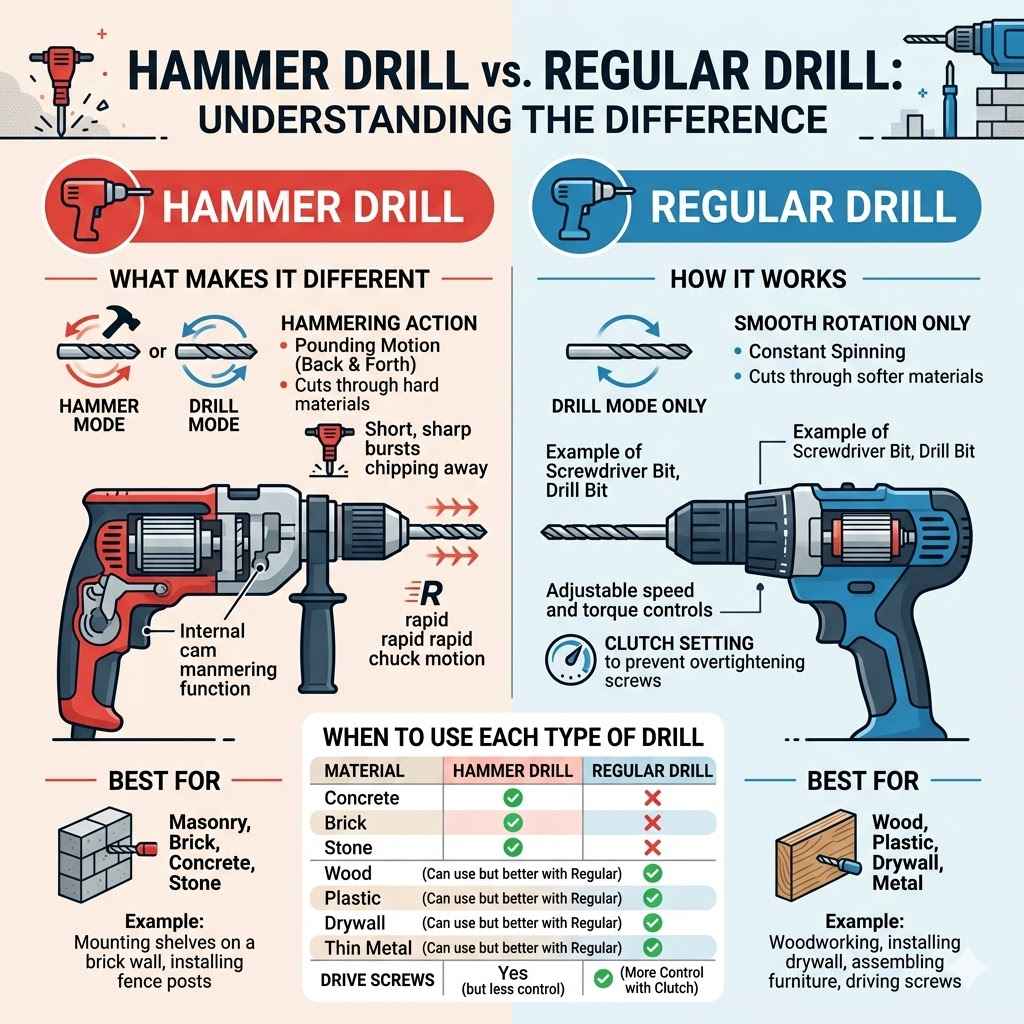
A hammer drill has two main actions: rotation and impact.
In normal drill mode, the motor turns the chuck and bit. This is the same basic action used by a standard cordless or corded drill.
In hammer mode, the tool also creates rapid forward impacts. Small ridges, discs, or gears inside the tool produce this motion. The impacts help the bit break through hard masonry.
You can think of the two modes this way:
| Tool mode | What it does | Common uses |
|---|---|---|
| Drill mode | Spins the bit only | Wood, metal, plastic, screws |
| Hammer-drill mode | Spins and lightly impacts | Brick, block, mortar, light concrete |
| Rotary-hammer mode | Uses stronger piston impact | Concrete, stone, heavy masonry |
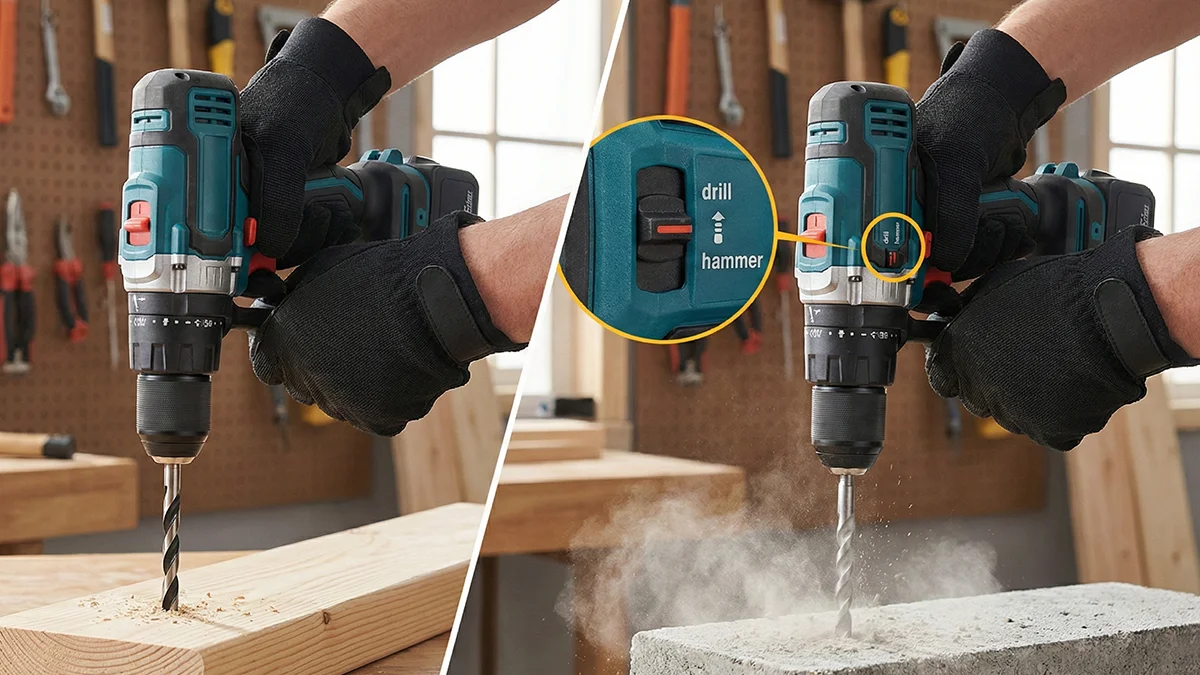
The exact controls vary by brand and model. A mode collar or selector may show a drill-bit symbol, a hammer symbol, or both symbols.
Always check the manual for your specific tool. For example, manufacturers such as DEWALT, Bosch, and Milwaukee Tool provide model-specific manuals and safety instructions.

How to Use a Hammer Drill as a Normal Drill
Follow these steps when you want to use a hammer drill for a regular drilling or driving job.
1. Turn off the power
Remove the battery or unplug the tool before changing the bit or adjusting the chuck. This prevents an accidental start.
For a cordless model, remove the battery pack. For a corded model, unplug it from the outlet.
2. Install the correct bit
Use a bit made for the material:
- Wood bit or twist bit for wood
- High-speed steel bit for most metal
- Brad-point bit for clean holes in wood
- Masonry bit for brick, block, or concrete
- Driver bit for screws
Do not use a masonry bit for wood if you need a clean, precise hole. Its cutting shape is made for abrasive mineral materials, not wood fibers.
3. Select drill mode
Set the mode selector to the drill-bit symbol. Do not select the hammer symbol.
Some models use a collar near the chuck. Others use a sliding switch or a separate control. If the selector does not move easily, do not force it. Release the trigger and let the chuck stop fully before changing modes.
4. Choose the speed
Use low speed for:
- Large drill bits
- Hole saws
- Driving long screws
- Starting a hole in metal
- Jobs that need more control
Use high speed for:
- Small drill bits
- Fast holes in wood
- Small holes in thin metal
- Light drilling where the bit manufacturer allows higher speed
A variable-speed trigger is useful. Start slowly so the bit does not wander. Increase speed only after the bit has started to cut.
5. Set the clutch for driving screws
If the tool has a clutch, use a low or medium setting when driving screws. The clutch slips when the tool reaches a set amount of resistance.
This helps reduce:
- Stripped screw heads
- Broken screws
- Damage to soft wood
- Overdriving below the surface
Use the drill setting, often marked with a drill-bit icon, when drilling holes. The drill setting usually bypasses the clutch and provides full torque.
6. Keep the tool straight
Hold the drill at a right angle to the work surface unless the design calls for an angled hole.
A straight position helps prevent:
- Bent bits
- Enlarged holes
- Rough edges
- Side pressure on the chuck
Let the bit cut at its own pace. Do not push so hard that the motor slows sharply or the bit binds.
What Materials Can You Drill Without Hammer Mode?
A hammer drill can work well in normal mode on many common materials. The correct bit and speed matter more than the word “hammer” on the tool.
Wood
Use drill mode for softwood, hardwood, plywood, and other wood products.
For a clean hole:
- Mark the center.
- Start at low speed.
- Keep the drill straight.
- Reduce pressure as the bit exits.
- Place scrap wood under the work if tear-out matters.
A brad-point bit gives better control in wood than a standard masonry bit.
Metal
Use drill mode for steel, aluminum, and other metals that the bit is rated to cut.
Metal needs more care than wood:
- Use a sharp high-speed steel bit.
- Start with a small pilot hole for larger holes.
- Use low speed for larger bits.
- Apply suitable cutting fluid when the bit and material allow it.
- Wear eye protection.
- Clamp the work securely.
Never hold a small metal workpiece in your hand while drilling. A rotating bit can grab it and spin it with force.
Plastic
Use drill mode and light pressure. Plastic can crack, melt, or grab the bit.
A sharp bit and moderate speed often work best. Backing the plastic with scrap wood can help support the exit point.
Drywall
A hammer drill is usually more tool than you need for drywall. Use drill mode if you need to make a hole for an anchor, but select a low speed and avoid crushing the board.
For many small anchors, a regular drill or even a hand tool may provide better control.
Masonry
For brick, concrete block, and some types of concrete, hammer mode may help. Use a masonry bit designed for impact drilling.
Not all concrete is equally easy to drill. A small hammer drill may handle light holes in brick or block but struggle with reinforced concrete or deep holes.
For heavy concrete work, a rotary hammer is normally more suitable.
Hammer Drill vs. Regular Drill
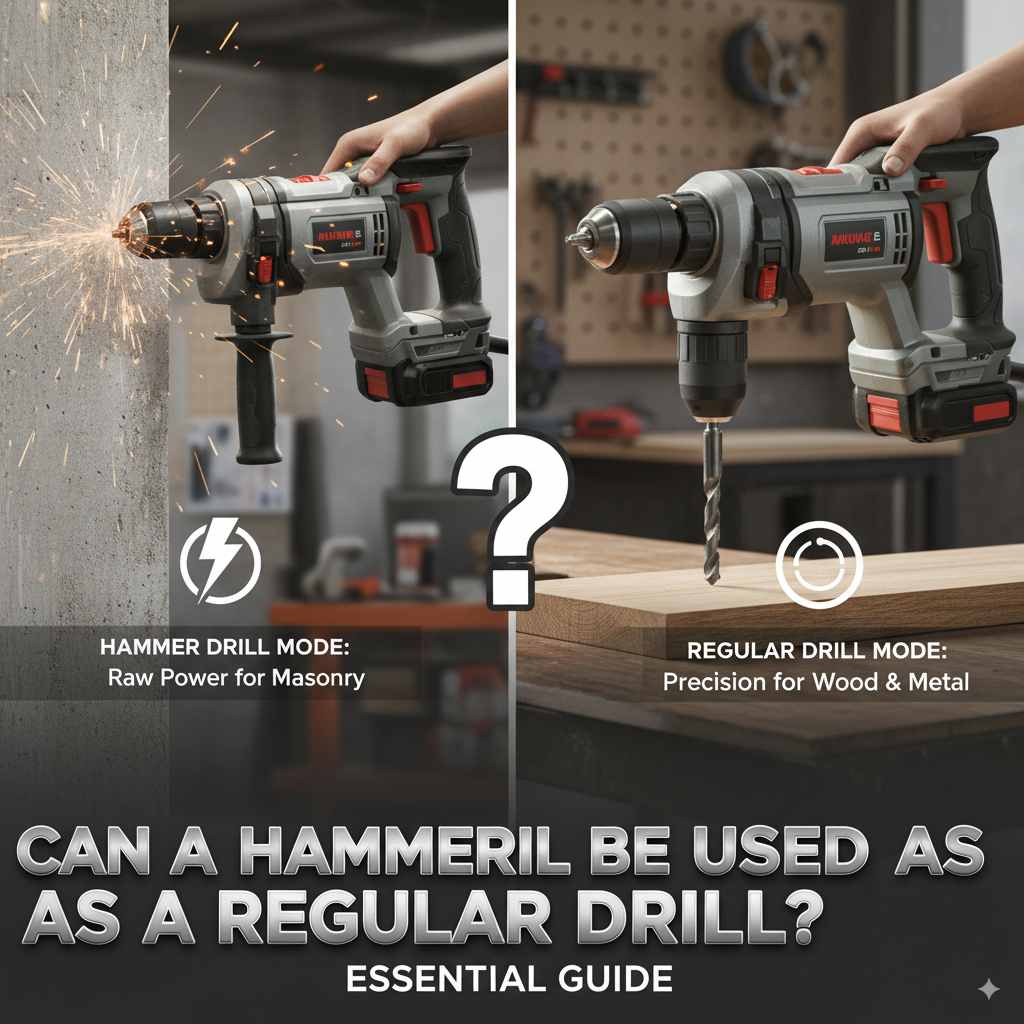
A hammer drill can replace a regular drill for many tasks, but the two tools are not identical.
| Feature | Hammer drill | Regular drill |
|---|---|---|
| Normal drilling | Yes | Yes |
| Hammer action | Yes | No |
| Masonry work | Better suited | Usually poor or slow |
| Weight | Often heavier | Usually lighter |
| Noise and vibration | Higher, especially in hammer mode | Lower |
| Small screw work | Usable with care | Often easier |
| Long periods of wood drilling | Can feel tiring | Usually more comfortable |
| Cost | Often higher | Often lower |
The main benefit of a hammer drill is flexibility. One tool can handle both normal drilling and light masonry work.
The main drawback is size and comfort. If you mostly assemble furniture, drill small wood holes, and drive screws, a regular drill may be easier to control.
A hammer drill is a good fit when you:
- Work on brick or block from time to time
- Want one tool for several materials
- Need more power than a small household drill
- Already own the tool
- Do not mind extra weight
A standard drill may be better when you:
- Do mostly cabinetry or furniture work
- Drive many small screws
- Need a light tool for overhead work
- Value quiet operation
- Rarely drill masonry

Does Hammer Mode Damage Wood or Metal?
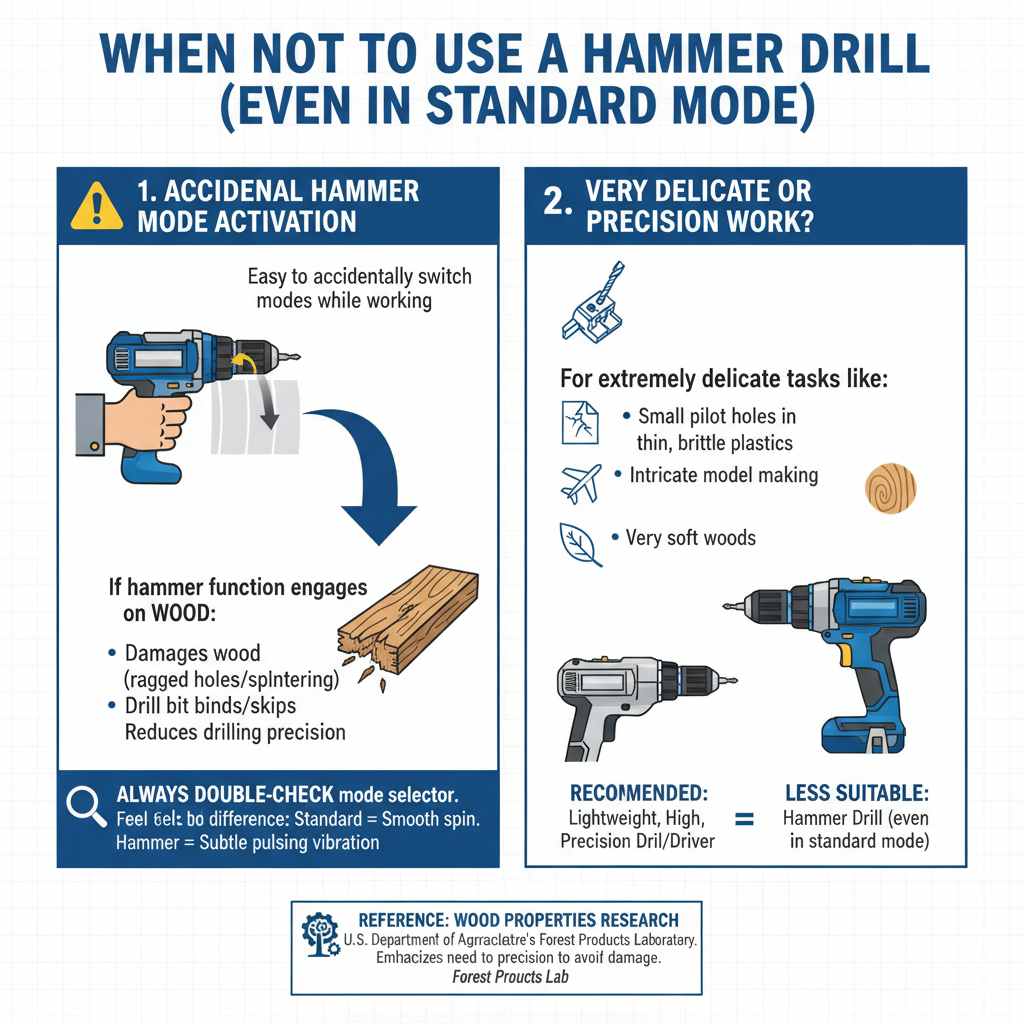
Yes, it can. Do not use hammer mode on wood, metal, plastic, or finished surfaces unless the tool and bit instructions specifically allow it.
The impact action can cause:
- Splintered wood
- Oversized holes
- Dented metal
- Broken small bits
- Damaged screw heads
- Excess wear on the tool
- Loss of control
Hammer mode is designed to help break brittle mineral material. Wood and metal need cutting, not repeated impact.
Some specialized accessories may have their own instructions. Follow the accessory maker’s directions rather than assuming that every bit works in every mode.
Can You Drive Screws With a Hammer Drill?
Yes, but use the correct settings.
Set the tool to:
- Drill mode, not hammer mode
- Low speed
- A low or medium clutch setting
- The correct driver bit
A hammer drill can drive screws, but a drill/driver or impact driver may be more comfortable for repeated screw work.
An impact driver is different from a hammer drill. It applies rotational impacts to help turn screws. A hammer drill applies forward impacts to help drill masonry. The names sound similar, but the mechanisms and uses differ.
Use a hand screwdriver for small, delicate screws when maximum control matters.

Can You Use a Hammer Drill With a Drill Press Stand?
Sometimes, but only if the stand maker and drill manufacturer allow it.
A drill press stand must safely support the tool’s shape, weight, trigger position, and chuck. Hammer mode should not be used in a stand unless the stand is specifically designed for that purpose. The impact can damage the stand or create unsafe movement.
A drill press stand also does not turn a handheld hammer drill into a full drill press. It may provide better alignment, but it may not offer the same speed control, quill travel, table support, or guarding.
Read both manuals before mounting the tool.
Common Problems and How to Fix Them
The drill mode will not engage
Release the trigger and wait for the chuck to stop. Move the selector only when the tool is not running.
If the selector still will not move, the internal parts may be under load. Gently rotate the chuck by hand after removing power, if the manual permits it. Never force the control.
A broken selector may require service.
The bit wobbles
A loose or crooked bit is the most common cause.
Remove the bit and reinstall it. Tighten the chuck evenly. On a keyed chuck, use the key in each chuck position if the design calls for it.
If the bit still wobbles, inspect the bit and chuck for damage. Do not use a bent bit.
The drill overheats
Stop and let the tool cool if the housing becomes unusually hot, the motor smells burnt, or the tool loses power.
Possible causes include:
- Excess pressure
- A dull bit
- The wrong speed
- A bit that is too large
- A blocked cooling vent
- Continuous heavy use
Use a sharper bit, reduce pressure, and follow the manual’s duty-cycle guidance.
The hole is rough or oversized
Check that:
- Hammer mode is off for wood and metal.
- The bit is made for the material.
- The tool is held straight.
- The bit is not bent or dull.
- The workpiece is clamped.
- You are not forcing the tool sideways.
For wood, a brad-point bit may produce a cleaner hole. For metal, a sharp high-speed steel bit and a pilot hole may help.
The screw strips
The clutch may be set too high, the bit may be worn, or the tool may be running too fast.
Use a fresh driver bit that matches the screw head. Apply firm, straight pressure. Start at low speed and let the clutch stop the tool before the screw goes too deep.
Safety Rules for Using a Hammer Drill
Read the owner’s manual before use. Manufacturer instructions can differ by model, battery system, chuck type, and accessory rating.
Basic safety practices include:
- Wear safety glasses with side protection.
- Secure the workpiece before drilling.
- Keep hands away from the rotating bit.
- Remove the battery or unplug the tool before changing accessories.
- Check for hidden wires and pipes before drilling into walls.
- Keep the cord away from the bit on corded models.
- Do not wear loose clothing or jewelry.
- Use hearing protection during loud or extended work.
- Hold the tool with both hands when the bit may bind.
- Keep cooling vents clear.
- Use only bits rated for the tool and material.
- Stop if the tool vibrates abnormally, sparks excessively, or smells burnt.
The Occupational Safety and Health Administration provides general guidance on portable power tools and guarding through its Hand and Power Tools standard.
A drill bit can catch suddenly. This is known as binding or kickback. The risk is higher with large bits, hole saws, and metal work. Use the auxiliary handle when your model includes one.
When a Hammer Drill Is Not the Right Tool
A hammer drill is not the best choice for every job.
Use a regular drill when the work is mostly light wood, plastic, or screw driving and you want a smaller, smoother tool.
Use an impact driver when you drive many long screws or fasteners. It is built for high rotational force, but it is not a substitute for a hammer drill when you need forward impact for masonry.
Use a rotary hammer for frequent or heavy drilling in concrete, stone, or hard masonry. A rotary hammer can accept specialized accessories, such as SDS-Plus or SDS-Max bits, depending on the model.
Use a drill press when you need repeatable, straight holes in a workshop setting. A handheld hammer drill gives flexibility, but it does not provide the same fixed alignment.
Do not use a hammer drill for jobs that exceed its bit size, depth, material, or duty limits. The manual is the final source for those limits.

Quick Decision Guide
Choose normal drill mode when:
- You are drilling wood.
- You are drilling metal.
- You are drilling plastic.
- You are driving screws.
- You are making holes in drywall.
Choose hammer-drill mode when:
- You are drilling brick.
- You are drilling concrete block.
- You are making light holes in masonry.
- The bit is rated for hammer drilling.
Choose a different tool when:
- You need many holes in hard concrete.
- You need very clean, precise production holes.
- You must drive large numbers of screws.
- The tool is too heavy for the work.
- The material or bit exceeds the manufacturer’s limits.
The simplest rule is this: use the drill setting for cutting materials and the hammer setting only for masonry work that needs impact.

Frequently Asked Questions
Can a hammer drill replace a regular drill?
For many home projects, yes. It can drill and drive screws in normal mode. A regular drill may still be lighter, quieter, and easier to control for small or delicate work.
Should the hammer function be on for wood?
No. Turn hammer mode off for wood. Impact can cause splintering, rough holes, and loss of control.
Can a hammer drill drill through steel?
Yes, in normal drill mode, if the bit is rated for steel and the tool has enough power. Use a sharp high-speed steel bit, the correct speed, and secure the metal firmly.
Can a hammer drill drill concrete?
Yes, many hammer drills can drill small or moderate holes in concrete. Use a masonry bit rated for hammer drilling. For deep, large, or frequent concrete holes, a rotary hammer is usually the better choice.
Is a hammer drill the same as an impact driver?
No. A hammer drill uses forward impact for masonry. An impact driver uses rotational impact for fasteners. Both can rotate a bit, but they serve different main purposes.
Can I leave the hammer drill in normal mode all the time?
Yes, if normal mode is selected and the tool is stored safely. Check the selector before each job so you do not begin drilling with the wrong setting.
Conclusion
A hammer drill can be used as a normal drill in most common situations. Set it to the drill-bit symbol, use the right bit, choose a suitable speed, and keep the tool straight.
Use hammer mode only for compatible masonry work. For light household drilling, a standard drill may be more comfortable. For heavy concrete work, a rotary hammer may be safer and more effective.
Before starting, check the tool manual and accessory instructions. Then match the mode, bit, speed, and pressure to the material.
Recent Tool Guides
 Hammer
How To Hammer Flowers Onto Paper: Easy Guide
Learn how to hammer flowers onto paper with simple steps, helpful tips, and beautiful results for...
Read Guide → Wrench
How To Use A Hex Wrench: Easy Step-By-Step Guide
Learn how to use a hex wrench correctly with simple steps, helpful tips, and common mistakes...
Read Guide → Hacksaw
How To Cut Curtain Pole With Hacksaw: Easy Guide
Learn how to cut curtain pole with hacksaw safely and neatly. Follow simple steps for accurate...
Read Guide → Wrench
How To Use A Husky Torque Wrench: Easy Guide
Learn how to use a Husky torque wrench correctly with simple steps, torque settings, and safety...
Read Guide → Hammer
How To Hold A Hammer: Safe Grip Guide
Learn how to hold a hammer with the right grip, stance, and technique for safer, more...
Read Guide → Hacksaw
How To Cut Flexible Metal Conduit With Hacksaw: Easy Guide
Learn how to cut flexible metal conduit with hacksaw safely and cleanly. Follow simple steps for...
Read Guide →