What Size Wrench Battery Terminal: Find The Right Fit
For most cars and trucks in the United States, a 10 mm wrench or socket fits the battery terminal clamp. Some vehicles use a 1/2-inch wrench, especially older vehicles or models with SAE fasteners. A few use 8 mm, 11 mm, or another size.
The safest method is simple: use the exact size that fits the terminal nut without slipping. Do not force a loose wrench onto the nut. A poor fit can round the nut or cause a short circuit.
This guide explains how to identify the right wrench, which terminal to remove first, and how to work safely around a 12-volt car battery.

The Quick Answer: Start With a 10 mm Wrench
A 10 mm wrench or socket is the most common first choice for a modern U.S. car battery terminal. A 10 mm tool often fits the nut that tightens the cable clamp around the battery post.
Still, battery hardware is not identical on every vehicle. The correct size may depend on:
- The vehicle’s make, model, and year
- Whether the battery uses metric or SAE hardware
- The type of terminal clamp
- Factory repairs or replacement parts
- The battery hold-down design
A 1/2-inch wrench is close in size to a 13 mm metric wrench, but it is not the same. Do not use one as a substitute if it feels loose.
Common battery-related wrench sizes
| Job | Common size | Notes |
|---|---|---|
| Battery terminal clamp | 10 mm | Common on many newer vehicles |
| Battery terminal clamp | 1/2 inch | Common on some older U.S. vehicles |
| Battery terminal clamp | 8 mm | Found on some small or aftermarket clamps |
| Battery hold-down nut | 10 mm, 12 mm, or 13 mm | Varies widely |
| Battery hold-down nut | 1/2 inch or 9/16 inch | More common on some older vehicles |
| Side-post battery bolt | 8 mm or 10 mm | Depends on the bolt and vehicle |
The terminal clamp and the battery hold-down may use different sizes. You may need one wrench for the cable and another for the bracket.

How to Find the Correct Battery Terminal Wrench Size
The best way to find the size is to test a socket or wrench by hand before turning it.
1. Identify the battery terminals
A typical automotive battery has:
- A positive terminal, marked with a plus sign or a red cover
- A negative terminal, marked with a minus sign or connected to the black ground cable
The cable may attach to the top of the battery post or to the side of the battery case.
2. Choose a snug-fitting tool
Place a socket or wrench over the terminal nut.
The correct tool should:
- Slide fully onto the nut
- Fit with little side-to-side movement
- Turn the nut without slipping
- Leave the corners of the nut intact
If the tool rocks on the nut, try another size. Do not rely on an adjustable wrench unless you have no better option. An adjustable wrench can slip more easily in the tight space around a battery.
3. Test metric and SAE sizes carefully
if 10 mm does not fit, try 1/2 inch. Use light hand pressure only.
Do not hammer a socket onto a battery terminal nut. If the nut is corroded or stuck, stop and clean the area before applying more force.
4. Check the owner’s manual
The owner’s manual may list battery service steps. It may not always list the exact wrench size, but it can show:
- The correct disconnect order
- Battery location
- Special battery sensors
- Reset procedures
- Warning notices
- Hold-down locations
A repair manual or service manual for the exact vehicle can provide more detail.
Which Battery Terminal Should You Remove First?
Remove the negative terminal first. Reconnect the negative terminal last.
This order lowers the risk of an accidental short.
To disconnect the battery
- Turn off the engine and remove the key.
- Set the parking brake.
- Turn off all electrical accessories.
- Find the negative terminal marked with a minus sign.
- Use the correct wrench to loosen the negative clamp nut.
- Lift the negative cable off the post.
- Move the cable away so it cannot touch the terminal.
- Remove the positive cable only if the job requires it.
To reconnect the battery
- Connect the positive cable first.
- Tighten the positive clamp.
- Connect the negative cable.
- Tighten the negative clamp.
- Check that both clamps are secure.
The reason is simple. The vehicle body is connected to the negative side of the electrical system. If the negative cable is still connected and your metal wrench touches the positive terminal and the body, the wrench can create a direct short.
A short may cause sparks, damage, burns, or a battery explosion. Removing the negative cable first breaks that path.

What Tools Do You Need to Remove a Battery Terminal?
For a basic battery terminal job, you usually need only a few tools.
Basic tool list
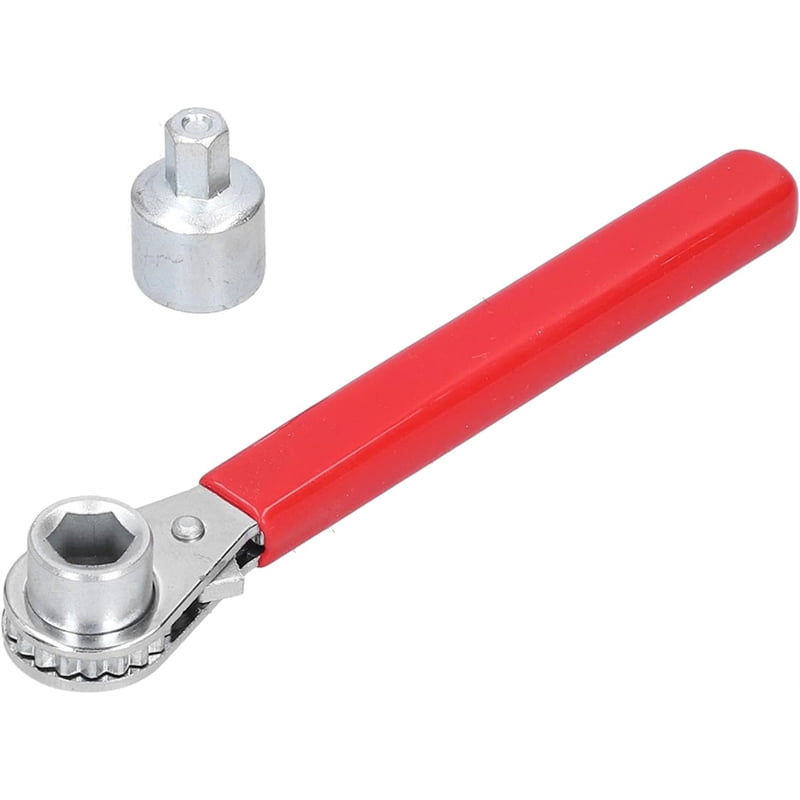
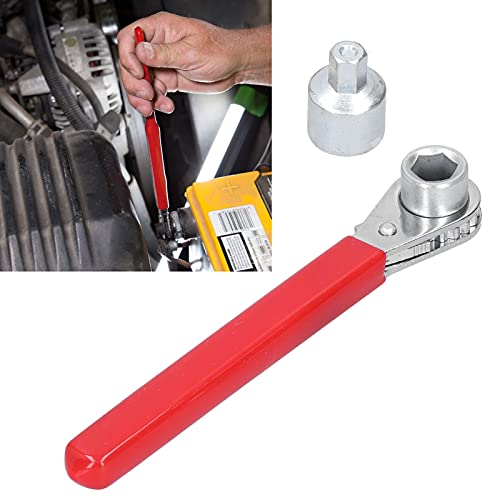
- 10 mm wrench or socket
- 1/2-inch wrench or socket as an alternative
- Ratchet, if using a socket
- Safety glasses
- Work gloves
- Battery terminal brush
- Small wire brush
- Terminal puller for a stuck clamp
- Battery memory saver, if the vehicle requires one
A deep socket may help if the terminal nut sits on a long threaded stud. An extension can make access easier, but use care around the positive terminal.
When a socket is better than a wrench
A socket usually gives a better grip and makes it easier to work in a narrow engine bay. A wrench can be useful when:
- The terminal is close to a battery case
- A socket cannot fit over the nut
- The cable design blocks straight access
- You need to hold a second nut
Use a tool with an insulated handle when possible. Insulation does not make careless contact safe, but it can reduce the chance of accidental contact.

How to Remove a Battery Terminal Safely
Follow these steps when the terminal is in normal condition and easy to reach.
Step 1: Park safely
Park on a level surface. Turn off the engine. Remove the key or keep the key fob away from the vehicle if the car can wake its electrical system.
Do not smoke or create sparks near the battery. Lead-acid batteries can release flammable hydrogen gas.
Step 2: Protect yourself
Wear safety glasses and gloves. Remove rings, watches, bracelets, and other metal jewelry.
Do not place tools on top of the battery. A metal tool can connect the two terminals or connect the positive terminal to the vehicle body.
Step 3: Disconnect the negative cable
Use the correct wrench to loosen the negative terminal nut. You usually do not need to remove the nut completely.
Lift the clamp straight up. If it does not move, gently twist it. Do not pry against the battery case.
Step 4: Disconnect the positive cable if needed
Only remove the positive cable when the repair requires it. Keep the wrench away from the vehicle body and other metal parts.
Step 5: Clean and inspect the connection
Look for:
- White, blue, or green corrosion
- A cracked clamp
- Loose cable strands
- Heat damage
- A damaged battery post
- A swollen battery case
Clean light corrosion with a terminal brush. A damaged clamp or swollen battery needs more than a new wrench size. It may need replacement and professional inspection.
Step 6: Reconnect in the correct order
Reconnect the positive cable first, then the negative cable. Tighten each clamp until it is secure.
Do not overtighten. Too much force can damage the clamp, terminal post, or battery case. If the manufacturer gives a torque specification, follow it.

Top-Post, Side-Post, and Hold-Down Hardware
The battery design changes the tool you need.
Top-post batteries
Top-post batteries have terminals on the upper surface. Their clamp nuts often use a 10 mm or 1/2-inch wrench.
These are common in many cars, trucks, and SUVs sold in the United States.
Side-post batteries
Side-post batteries connect through bolts on the side of the battery. The bolt head may use an 8 mm or 10 mm tool, but the exact size varies.
Do not confuse the side-post bolt with a top-post clamp nut. The removal method may look different.
Battery hold-down brackets
The hold-down keeps the battery from moving. It may use:
- A 10 mm nut
- A 12 mm or 13 mm nut
- A 1/2-inch nut
- A 9/16-inch nut
- A threaded rod with a special bracket
A secure hold-down matters. A loose battery can move, damage its cables, or crack from vibration.

What If the Battery Terminal Nut Is Stuck?
A stuck nut often results from corrosion, over-tightening, or a damaged clamp.
Try these steps:
- Confirm that the wrench fits correctly.
- Brush away loose corrosion.
- Apply a small amount of penetrating oil to the nut, keeping it away from the battery openings.
- Wait according to the product label.
- Try steady pressure with a six-point socket.
- Use a terminal puller if the clamp is stuck on the post.
Avoid using a torch or open flame near a battery. Do not strike the battery post or pry hard against the battery case.
If the nut begins to round off, stop. A repair shop may need to replace the clamp or use a specialized removal tool.
Can You Use Pliers on a Battery Terminal?
Pliers may loosen a small clamp in an emergency, but they are not the best tool. They can slip, damage the nut, or touch nearby metal.
Use a correctly sized wrench or socket whenever possible. A six-point socket is often safer for a tight or partly rounded nut because it grips the flat sides more firmly.
Do not use pliers to twist the battery post itself. A damaged post can make the battery unsafe or unusable.
Battery Terminal Safety Warnings
A car battery can deliver very high current even though its voltage is only about 12 volts. That current can heat a tool quickly and cause serious sparks.
Follow these limits:
- Do not short the positive and negative terminals.
- Do not let a wrench touch the positive terminal and body metal at the same time.
- Do not work on a cracked, leaking, or badly swollen battery.
- Do not smoke near a lead-acid battery.
- Keep flames and sparks away.
- Do not disconnect a battery while the engine is running.
- Do not guess when a vehicle has special battery electronics.
Some vehicles have a battery monitoring sensor on the negative cable. Some have a second battery or complex power management system. Hybrid and electric vehicles contain high-voltage systems. The 12-volt battery may still be serviceable, but high-voltage parts must not be touched. Follow the vehicle service manual or use a qualified technician.
Does Disconnecting the Battery Erase Vehicle Settings?
It can. Disconnecting the battery may reset or affect:
- Clock and radio settings
- Window auto-up functions
- Seat or mirror memory
- Anti-theft radio systems
- Engine idle learning
- Diagnostic trouble codes
- Transmission learning
- Emissions readiness monitors
Some vehicles need a radio security code after power loss. Others require a scan tool or relearn procedure.
Check the owner’s manual before disconnecting the battery. If preserving settings matters, use a memory-saving device only when the vehicle maker allows it and the device is connected correctly.
A memory saver does not make battery work risk-free. The battery terminals can still short, and the vehicle may still have specific service rules.

Common Mistakes When Choosing a Battery Wrench
Assuming every battery uses 10 mm
10 mm is common, but it is not universal. Check the fit before turning the nut.
Confusing the clamp with the hold-down
The terminal clamp may use 10 mm while the hold-down uses 13 mm or 1/2 inch. Identify the part you need to remove.
Using the wrong close size
A 13 mm tool may feel close to 1/2 inch, but a loose fit can damage the nut. Use the correct size.
Removing the positive terminal first
This increases short-circuit risk. Remove the negative terminal first unless the vehicle service instructions specify a special procedure.
Forgetting the terminal sensor
Do not force or twist a sensor attached to the negative cable. It may be part of the vehicle’s battery monitoring system.
Overtightening the terminal
The clamp should hold firmly without excessive force. Follow the specified torque when available.
FAQ: Battery Terminal Wrench Size
Is a 10 mm wrench the same as a 3/8-inch wrench?
No. A 10 mm wrench is slightly larger than a 3/8-inch wrench. They may seem close, but the fit can be poor. Use the size that sits tightly on the nut.
Is a 1/2-inch wrench the same as a 13 mm wrench?
No. A 1/2-inch wrench measures 12.7 mm, while a 13 mm wrench measures 13 mm. They are close, but the correct choice depends on the fastener and how tightly the tool fits.
What size wrench removes a car battery?
Most often, a 10 mm or 1/2-inch wrench removes the terminal clamp. The battery hold-down may require 10 mm, 12 mm, 13 mm, 1/2 inch, or another size.
Should I disconnect the negative or positive battery terminal first?
Disconnect the negative terminal first. When reconnecting, connect the positive terminal first and the negative terminal last.
Can I change a battery without disconnecting the terminals?
No. The cables must be disconnected to remove the battery safely. The negative cable should come off first, and the positive cable should be removed only after the negative connection is isolated.
Final Answer
For most U.S. cars, try a 10 mm wrench or socket first. If it does not fit, check for a 1/2-inch wrench, then inspect the terminal and vehicle manual for the correct size.
Use a snug tool, remove the negative cable first, keep metal tools away from the battery, and reconnect the positive cable before the negative cable. If the battery is damaged, the terminal is badly corroded, or the vehicle has hybrid or complex battery systems, stop and use qualified service.
Recent Tool Guides
 Hammer
How To Hammer Flowers Onto Paper: Easy Guide
Learn how to hammer flowers onto paper with simple steps, helpful tips, and beautiful results for...
Read Guide → Wrench
How To Use A Hex Wrench: Easy Step-By-Step Guide
Learn how to use a hex wrench correctly with simple steps, helpful tips, and common mistakes...
Read Guide → Hacksaw
How To Cut Curtain Pole With Hacksaw: Easy Guide
Learn how to cut curtain pole with hacksaw safely and neatly. Follow simple steps for accurate...
Read Guide → Wrench
How To Use A Husky Torque Wrench: Easy Guide
Learn how to use a Husky torque wrench correctly with simple steps, torque settings, and safety...
Read Guide → Hammer
How To Hold A Hammer: Safe Grip Guide
Learn how to hold a hammer with the right grip, stance, and technique for safer, more...
Read Guide → Hacksaw
How To Cut Flexible Metal Conduit With Hacksaw: Easy Guide
Learn how to cut flexible metal conduit with hacksaw safely and cleanly. Follow simple steps for...
Read Guide →