
Introduction
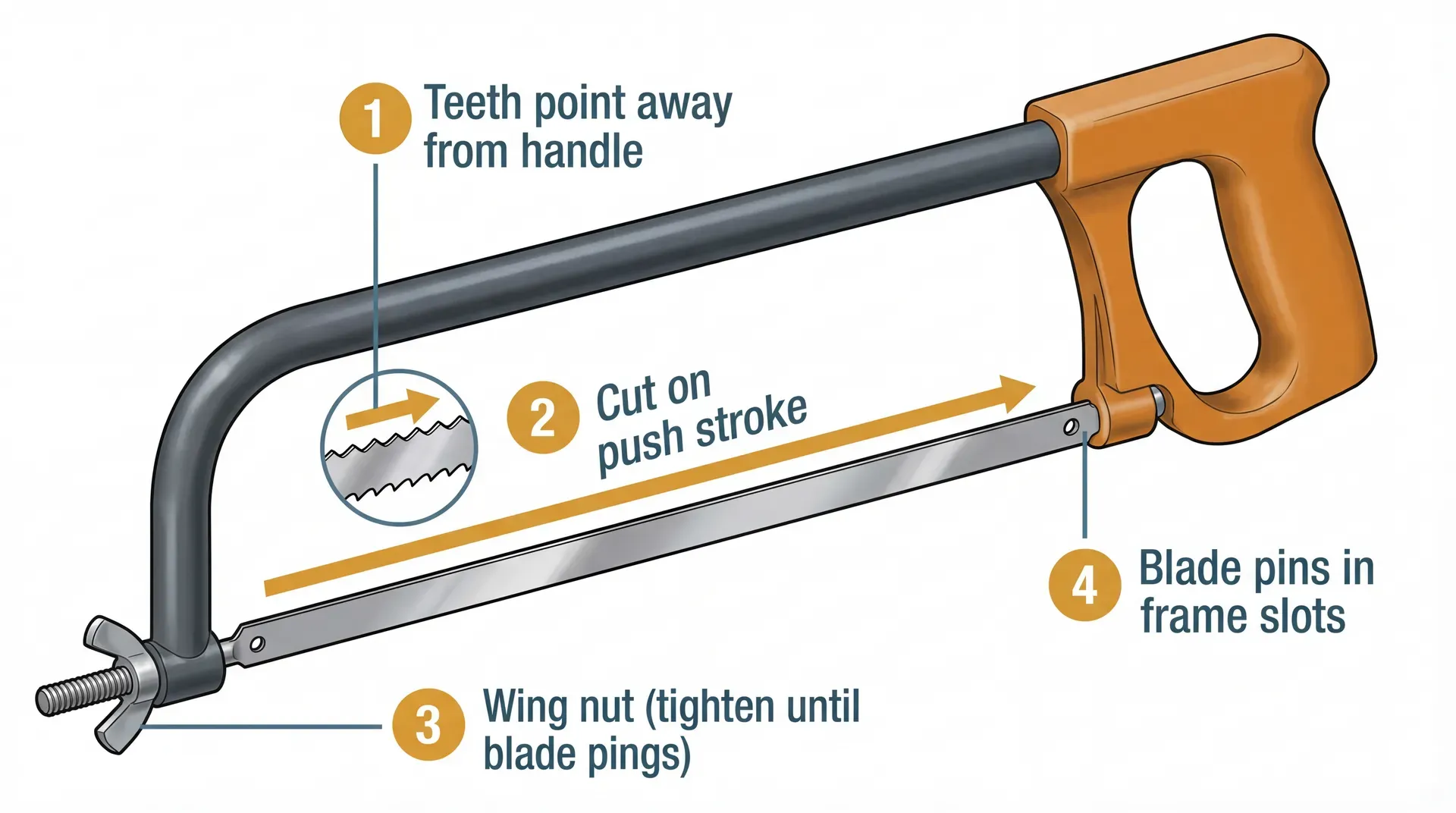
For most hacksaws used in the United States, the blade teeth point away from the handle. The teeth should face forward, toward the end of the frame. This lets the blade cut as you push the hacksaw away from your body.
A hacksaw normally cuts on the forward stroke, not the pull stroke. The return stroke brings the blade back without cutting. If the teeth face the wrong way, the saw may skid, cut poorly, or damage the blade.

Quick Answer: Which Way Should Hacksaw Teeth Face?
Install a standard hacksaw blade with the teeth pointing forward, away from the handle.
The handle is usually at the rear of the hacksaw frame. The open end of the frame is at the front. When you hold the saw in a normal cutting position:
- The blade teeth point away from you.
- The teeth cut as you push the saw forward.
- The smooth back edge of the blade faces the handle.
- The blade should be tight before you start cutting.
This setup applies to most full-size hacksaws, junior hacksaws, and common metal-cutting hacksaws sold in the United States.
The simple rule
Teeth point forward. Push to cut.
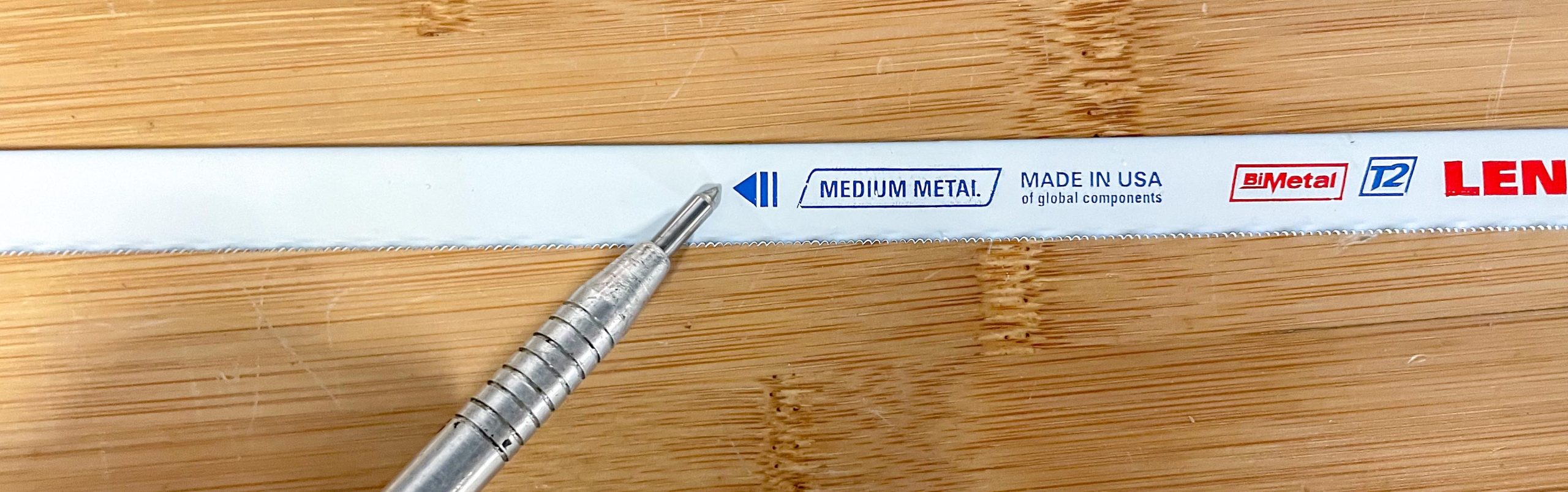
Some hacksaw blades have arrows stamped on them. If an arrow is present, point it in the direction of the cutting stroke.

Why Do Hacksaw Teeth Point Forward?
A hacksaw blade has small teeth that work like tiny chisels. Each tooth removes a small amount of material as it moves across the workpiece.
With the teeth facing forward, the push stroke places the cutting edge against the metal, plastic, or other material. Your arm can then apply steady force through the saw frame.
If you install the blade backward, the teeth face away from the cutting force. The saw may still scrape the surface, but it will not cut well. You may also bend, dull, or break the blade.
Most hacksaw blades are designed for this forward-cutting action. The frame holds the blade under tension so the teeth stay in line during the push stroke.
Pull-cut saws are different
Some hand saws are designed to cut when pulled. A Japanese pull saw is one example. A standard hacksaw is not normally used this way.
Do not assume that every hand saw uses the same tooth direction. Check the blade markings and the tool instructions when the design is unfamiliar.

How to Install a Hacksaw Blade Correctly
Follow these steps when changing a standard hacksaw blade.
1. Loosen the blade tension
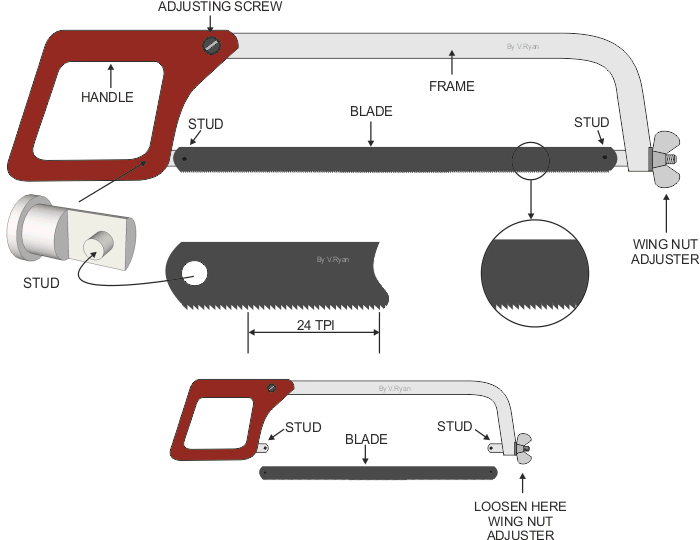
Turn the tension knob or wing nut until the old blade becomes loose. Do not force the fastener. If it is stuck, use the correct tool and keep your fingers away from the blade.
2. Remove the old blade
Lift the blade from the mounting pins or posts. Wear work gloves if the old blade has sharp or broken teeth.
3. Find the cutting direction
Look for:
- An arrow stamped on the blade
- A printed tooth-direction mark
- The tooth pattern along the edge
Point the teeth or arrow toward the front of the hacksaw frame.
4. Fit both blade holes onto the posts
place one hole over the rear post, then fit the other hole over the front post. The blade must sit flat in both mounts.
A blade that rests on only one post can slip or twist. Do not use the saw until both ends are secure.
5. Tighten the blade
Turn the tension knob until the blade is firm. It should not sag or move from side to side.
Do not overtighten it. Too much tension can bend the frame, damage the mounting holes, or cause the blade to snap.
6. Check the blade by hand
With the saw away from the workpiece, lightly press the side of the blade with one finger. It should feel firm, not loose.
Never test sharpness by sliding your finger along the teeth.

How Tight Should a Hacksaw Blade Be?
A hacksaw blade should be tight enough to stay straight during a cut, but not so tight that the frame or blade is under extreme stress.
A loose blade may:
- Twist during the cut
- Wander away from your mark
- Produce a rough edge
- Bend or break
An overly tight blade may:
- Break without warning
- Damage the frame
- Pull out a blade mounting hole
- Increase the risk of hand injury
The best check is simple: the blade should remain straight when you use light finger pressure on its side. It should not hang loose or wobble.
Some professional frames include a tension lever or calibrated tension system. Follow the frame maker’s instructions when a specific tension setting is provided.

How to Use a Hacksaw After Installing the Blade
Correct blade direction helps, but cutting technique also affects the result.
Mark the cut
Use a pencil, marker, or scribe to mark the cut line. For metal, a fine marker or machinist’s scribe can make a clearer line.
Secure the workpiece
Clamp the material in a vise or hold it with a suitable fixture. Do not hold small metal parts in your hand while cutting.
The cut area should sit close to the vise jaws. This reduces vibration and helps prevent the material from bending.
Start with a shallow notch
Place the middle of the blade on the cut line. Use short, light strokes to create a small groove.
Once the groove guides the blade, use longer strokes. This helps prevent the blade from sliding off the mark.
Use steady pressure
Push the saw forward with moderate pressure. Let the teeth do the work. Do not force the frame.
Lift pressure slightly on the return stroke. This reduces unnecessary wear on the blade.
Use most of the blade length
Move the hacksaw through a long part of the blade when possible. Short strokes wear only a few teeth and can create hot spots.
Keep the frame steady and use smooth, even strokes.
Slow down near the end
When the cut is almost complete, reduce pressure. The remaining material can break suddenly, and the saw may lurch forward.
Support the cut-off piece if it could fall or pinch the blade.
Which Hacksaw Blade Tooth Count Should You Use?
Tooth count describes the number of teeth per inch, often written as TPI. The correct choice depends on the material and its thickness.
| Blade size | Common use | Main advantage |
|---|---|---|
| 14 TPI | Thick metal, heavy stock, soft materials | Removes material quickly |
| 18 TPI | General cutting of thicker metal | Good balance of speed and control |
| 24 TPI | Thin-wall tubing, sheet metal, small stock | Helps prevent tooth snagging |
| 32 TPI | Very thin metal and delicate work | Keeps several teeth in the work |
As a basic rule, at least two or three teeth should stay in contact with the material during the cut. If only one tooth engages, it may catch and break. If too many teeth engage in thick stock, the blade may cut slowly and clog.
For thin material, choose a finer blade. For thick material, choose a coarser blade.
Tooth count does not change the normal direction. The teeth still point forward on a standard hacksaw.
What If the Hacksaw Blade Has Teeth on Both Edges?
A double-sided blade can cut in more than one direction, but it is not the most common setup for a standard hacksaw.
Some specialty frames use blades with teeth on both edges. Others use a blade that can be mounted in different positions for access to tight spaces.
Check the frame design before changing the direction. If the blade has teeth on only one edge, use the forward-facing setup unless the manufacturer says otherwise.
Do not reverse a blade simply because the cut feels hard. First check:
- Whether the teeth face forward
- Whether the blade is tight
- Whether the blade has the right TPI
- Whether the workpiece is secure
- Whether the blade is worn or damaged

Can You Put a Hacksaw Blade on Backward?
You can physically mount many hacksaw blades backward, but you should not use a standard blade that way.
A backward blade may:
- Fail to cut properly
- Slide across the workpiece
- Require excessive force
- Bend or snap
- Leave a rough or uneven cut
Some people reverse a blade as a short-term way to protect the teeth while moving the tool or working in a tight space. That does not make it a normal cutting position. Turn the blade back before cutting.
If the teeth point toward the handle, remove and reinstall the blade with the teeth facing forward.

Hacksaw Blade Direction for Different Tools
The correct direction depends on the type of tool.
Standard hacksaw
Point the teeth forward, away from the handle. The blade cuts on the push stroke.
Junior hacksaw
Most junior hacksaws also use a forward-cutting blade. Point the teeth toward the open end of the frame.
Mini hacksaw
Many mini hacksaws use a short blade mounted with the teeth facing forward. Check the frame because some models use a different holder.
Reciprocating saw
A reciprocating saw is not a standard hacksaw. Its blade moves back and forth by machine power. The blade direction depends on the blade design and the cut position.
Many reciprocating saw blades have teeth facing away from the tool body, but some specialty blades are made for other cutting actions. Follow the blade or saw instructions.
Coping saw
A coping saw has a narrow blade and a different frame. Its teeth commonly face toward the handle because the tool is designed for a pull cut.
Do not use the coping saw rule for a standard hacksaw. The tools work in different ways.

Common Hacksaw Blade Problems and Fixes
The blade will not cut
Check the blade direction first. The teeth should point away from the handle.
Then check whether:
- The blade is worn out
- The teeth are too fine for thick material
- The workpiece is moving
- The blade is loose
- You are using too little stroke length
The blade keeps breaking
A broken blade often results from twisting, excess force, or poor support.
Try these fixes:
- Tighten the blade correctly
- Keep the frame square to the cut
- Use steady pressure
- Stop forcing the saw
- Choose a blade with the right TPI
- Keep the workpiece close to the vise
A blade can also break if the frame is bent or the mounting posts are damaged.
The saw jumps off the cut
Start with short strokes and a light touch. Once a groove forms, increase the stroke length.
A dull blade, loose workpiece, or excessive pressure can also make the saw jump.
The cut takes too long
The blade may have too many teeth for the material. A 32-TPI blade cuts thin stock well but may cut thick steel very slowly.
A worn blade can also waste time. Replace it when the teeth look rounded, missing, or uneven.
The blade cuts at an angle
Keep the frame square to the workpiece. Uneven pressure can push the blade sideways.
Also check whether the blade is bent. A bent blade should be replaced rather than forced straight.
Safety Rules for Using a Hacksaw
A hacksaw is a simple hand tool, but its blade can cause cuts and puncture injuries.
Use these basic precautions:
- Wear safety glasses when cutting metal or brittle plastic.
- Keep both hands behind the blade teeth.
- Clamp the workpiece before cutting.
- Keep the blade tight and undamaged.
- Do not use a cracked or bent frame.
- Replace blades with missing or badly worn teeth.
- Cut away from your body when the work allows.
- Slow down near the end of the cut.
- Remove sharp burrs with a file after cutting.
- Store the hacksaw so the teeth cannot catch clothing or skin.
Do not use a hacksaw to cut energized electrical parts, pressurized lines, or materials that may contain hazardous substances. Isolate the hazard first or use a qualified professional when the risk is beyond basic hand-tool work.

Key Takeaways
- A standard hacksaw blade goes with the teeth pointing forward, away from the handle.
- The hacksaw normally cuts on the push stroke.
- Tighten the blade until it is firm, but do not overtighten it.
- Use a fine-tooth blade for thin stock and a coarser blade for thick stock.
- Secure the workpiece and start with short strokes.
- Replace blades that are bent, cracked, dull, or missing teeth.
- Check the tool instructions for specialty saws and unusual blade designs.
Frequently Asked Questions
Do hacksaw blades cut on the push or pull stroke?
Standard hacksaw blades cut on the push stroke. Point the teeth away from the handle so they engage the material as you push the frame forward.
Which way do the teeth go on a junior hacksaw?
On most junior hacksaws, the teeth point toward the open end of the frame and away from the handle. This gives the tool the same forward-cutting action as a standard hacksaw.
Should the smooth side of the hacksaw blade face the handle?
Yes. On a normal one-sided hacksaw blade, the smooth back edge faces the handle, while the toothed edge faces forward.
Can a hacksaw cut wood?
A hacksaw can cut some soft wood, but its fine metal-cutting teeth are not ideal for clean wood cuts. A wood saw or handsaw is usually faster and leaves a better surface.
How do I know when to replace a hacksaw blade?
Replace the blade when it has dull, rounded, missing, cracked, or uneven teeth. Also replace it if it bends during normal use or no longer cuts smoothly with the correct pressure.
Conclusion
For a standard hacksaw in the United States, install the blade with the teeth facing away from the handle. The saw should cut as you push it forward.
Before cutting, confirm the blade direction, set the right tension, choose a suitable tooth count, and clamp the workpiece. If the saw still slips or cuts poorly, stop and check the blade, frame, material, and cutting method instead of applying more force.